I have recently been diving into researching Fire Emblem: Shadow Dragon (FE11). I wanted to document my findings in hopes that it can be (a) useful to folks exploring the DS games, and (b) built upon over time.
Since I have some real-life commitments coming up over the next little while, I wanted to get the information I’ve found down on paper before it goes stale in my brain.
If you have any information from your own DSFE hacking explorations, please feel free to add any findings of your own to this thread!
There are a number of terms that I’ll use below, which I’ll try to define ahead of time.
First, the term “ARM9 binary”. When you unpack the DS ROM using a tool like DSLazy, it will have a file called “arm9.bin”. This file contains the main code for the game. The DS has two processors, and “ARM9” refers to the one responsible for running the game code.
When I reference code or ROM data, I’ll use the notation FE11:0x<...>. This refers to a memory location of the game when the game is running. Since the DS loads the ROM to a base of 0x02000000, you can find the equivalent location in the “arm9.bin” file by subtracting 0x02000000 from the in-game address. All offsets refer to the US version of the game.
If/when I eventually start referencing the code or data inside of an overlay, I’ll use the notation FE11:Ovy##_0x<...>.
For completeness, the DS also has an ARM7 processor (and an ARM7 binary), which was mainly used for sound processing and other auxiliary tasks. Nintendo allegedly discouraged using ARM7 for game logic, so I likely won’t reference it much in this thread.
In general, I highly recommend the post Starcube Labs - “Reverse Engineering a DS Game”. It gives what I think is a clear introduction to loading DS ROMs into reverse-engineering tools like Ghidra, and offers helpful tips on identifying code and setting breakpoints in emulators.
Other relevant DSFE resources:
- FE12 Nightmare Modules
- [FE12] Raddomizer - New Mystery Randomizer (+ FE12 Documentation!)
- Accessible FE12 hacking
- Changing Shop data in Fire Emblem 11 (Shadow Dragon)
Overlays
The Nintendo DS employs a system called “overlays” to manage memory efficiently. Overlays allow the console to dynamically load code or data into memory only when needed and unload it when it’s no longer required. This helps optimize the limited memory resources of the DS.
Details
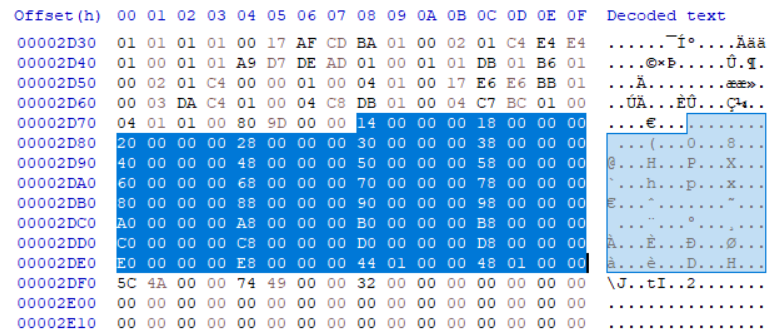
When you unpack a DSFE ROM using a tool like DSLazy, you will find a folder called “overlay”, which contains the binary files for each overlay. Additionally, the file “y9.bin” contains metadata about the overlays:
Overlay (Size: 0x20):
00 | word | Overlay ID
04 | word | Load address (where the overlay is placed in memory at runtime)
08 | word | Overlay size
0C | word | BSS (uninitialized data) size
10 | word | Static initializer start address
14 | word | Static initializer end address
18 | word | File ID
1C | word | 0 (delimiter between overlays)
For a detailed explanation of overlays, I recommend checking out the overlays section in the Starcube Laboratories post on Reverse Engineering a DS game.
FE11 features 12 overlays, which is relatively low compared to other DS games I’ve seen such as Pokemon HeartGold or Pokemon Mystery Dungeon: Explorers of Sky.
While the game is running, the table tracking the currently-loaded overlays is found at FE11:0x020E4DF4. It is represented by a series of bytes in memory. If an overlay is active, the byte value at that overlay’s index will be 1. If it’s inactive, the value will be 0.
The functions for managing overlays are as follows:
- Loading an overlay:
FE11:0x0200F20C - Unloading an overlay:
FE11:0x0200F24C
There are additionally proc commands that involve loading/unloading overlays, which we will see later when I talk about the DSFE proc system.
From my initial research:
- Overlay 0 and 2 are typically always active.
- Overlay 4 seems related to core gameplay (e.g. battle maps).
- Overlay 6 might handle the title and save screen.
There is still lots more to be uncovered about the overlays/how they are used.
Procs
FE11, like many other Fire Emblem games, features a “proc” system which is used to enable the game to do pseudo-parallel processing on an otherwise single-threaded CPU. This is something that has been very well detailed by others in the past:
- GBAFE - Nat - [GUIDE/DOC][ASM] "Procs" (or 6Cs, coroutines, threads, fibers, funky structs, whatever)
- PoR / RD - Nat - FE9-DOC/Procs.txt at master · StanHash/FE9-DOC · GitHub
- FE5 - Zane - [DOC][ASM][WIP]Procs: the FE5 version
- FE14 - Circles - [FE14] Misc Notes on Fates - #3 by circleseverywhere
For the sake of brevity, I won’t cover the entire scope of what procs are since I think Nat’s guide is already extremely thorough and comprehensive, and I would just be repeating a lot of that. Please read their research on it, and consider this to be the DSFE extension of that research.
Details
The DSFE proc system is, as far as I can tell, quite similar to the GBAFE proc system. It features the same general interfaces for starting/finding/ending procs, and the code itself appears to be relatively similar too.
There are a few differences. For example, each proc can have its own “function table”; a pointer to a list of callable functions that is stored at +0x00 of the proc. The purpose of this isn’t clear to me yet but I hope to understand how this complements the existing script-based format.
So far, I haven’t been able to identify things like what order the proc trees are executed in, or whether that is terribly important in DSFE.
The Proc Tree is located in RAM at FE11:0x02190F28.
The function at FE11:0x02018C58 seems to be equivalent to FE8’s Proc_Init. It iterates over 0x80 procs and initializes their fields to zero values. Based on that, it seems that the max proc count is 0x80 in FE11.
There appears to be 14 proc trees in FE11, based on the same Proc_Init function.
Many of the core functions for interacting with the procs are located in the “ITCM” (or “Instruction Tightly-Coupled Memory”) region. One of the features of the Nintendo DS is to give fast access to a limited amount of code.
What this means is that, at the time when the game is loaded, there is some code gets loaded the end of the ROM and put into a fast-access area. Most of the game’s code refers to the functions in that particular area. It makes it a touch more confusing for us as hackers to find references to that code (or at some point in the future, to modify it).
The Proc Function table is located at FE11:0x020E7898 in the ROM. It gets copied into the ITCM region, to FE11:0x01FFBBF8, when the game is running. In Nat’s doc, this aligns with the “Code Interpretation Table”.
Below, you can the locations of the proc functions along with some names that indicate their purposes (in most cases, I’ve tried to reuse the FE8 proc names where they seem to line up).
[00] 0x02019358 - ProcCmd_DELETE
[01] 0x02019358 - ProcCmd_DELETE
[02] 0x02019368 // returns 0
[03] 0x02019370 // returns 1
[04] 0x02019378 // advance and return 1
[05] 0x0201938c - ProcCmd_SET_DESTRUCTOR (?)
[06] 0x020193b4 - ? maybe set name?
[07] 0x020193dc - ProcCmd_CALL_ROUTINE
[08] 0x020193fc - ProcCmd_CALL_ARG_ADV
[09] 0x02019420 - ProcCmd_WHILE_ROUTINE
[0A] 0x0201945c - ProcCmd_CALL_ARG_ADVCOND (advance conditionally)
[0B] 0x0201951c - ?
[0C] 0x02019620 - ProcCmd_LOOP_ROUTINE
[0D] 0x02019640 - ProcCmd_WHILE_EXISTS
[0E] 0x02019674 - ProcCmd_NEW_CHILD
[0F] 0x020196a0 - ProcCmd_NEW_CHILD_BLOCKING
[10] 0x020196cc - ProcCmd_NEW_PROC_IN_TREE (?)
[11] 0x020196f8 - ProcCmd_END_ALL (sarg skips an additional pointer @ 027E1268)
[12] 0x02019734 - ProcCmd_BREAK_ALL (sarg skips an additional pointer @ 027E1268)
[13] 0x02019954 - ProcCmd_NOP_1D ? label?
[14] 0x02019770 - ProcCmd_GOTO
[15] 0x0201979c - ProcCmd_GOTO_IF_YES (if larg = 0 or larg func returns non-zero, goto)
[16] 0x020197e8 - ProcCmd_GOTO_IF_NO (same but if larg func returns zero)
[17] 0x02019834 - ProcCmd_JUMP
[18] 0x02019874 - ProcCmd_SLEEP
[19] 0x020198a4 - ProcCmd_SET_MARK (?)
[1A] 0x020198c4 - (?) end children?
[1B] 0x020198f8 - (?) end children?
[1C] 0x0201992c - (?) end children?
[1D] 0x02019954 - ProcCmd_NOP_1D
[1E] 0x02019968 - start a specific child (blocking if larg not &1)
[1F] 0x020199b8 - start a specific child (blocking if larg not &1)
[20] 0x02019a08 - start a specific child (blocking if larg not &1)
[21] 0x02019a58 - start a specific child (blocking if larg not &1)
[22] 0x02019aa8 - start a specific child (blocking if larg not &1)
[23] 0x02019af8 - start a specific child (blocking if larg not &1)
[24] 0x02019b48 - ProcCmd_OVERLAY - load or unload overlay; overlay ID = sarg, load/unload = larg
[25] 0x02019b84 - ProcCmd_ - maybe reset overlays? Unload all except sarg? Load only sarg?
Loading Units
Recently in the FEU Discord, there was some discussion about figuring out how units are loaded, particularly in the context of hard-mode scaling bonuses.
Details
The core function responsible for loading a unit is at FE11:0x02039FF8 in the main ARM9 binary. I’ve started decompiling the function here. Based on this, the function’s signature appears to be:
void func_02039FF8(struct Unit * unit, struct Dispo * dispo);
This function takes two parameters:
unit: A pointer to a Unit structure, which holds the data for the character being loaded.dispo: A pointer to a Dispo structure, which provides information about how the unit should be loaded onto the map.
What is a “dispo”?
“Dispos” are, as far as I understand, the internal name for the data structure used to specify how to place units on the map. It’s likely an abbreviation for “disposition”. There are code references in the FE8 prototype that mention the term “dispos”, and they’re more commonly referenced by this name in hacking when we start seeing more strings in the code (such as FE9-10, and the 3DSFE games).
Each map has several “dispo groups” associated with it, which are loaded at different times (for example, for cutscenes or reinforcements). The layout of a single “dispo” entry is like this:
Dispo Entry (Size: 0x50):
00 | short | pid (character ID)
02 | short | jid (class ID)
04 | byte  | x position on load
05 | byte  | y position on load
06 | ?
09 | byte  | ?
0A | byte  | starting level
0B | byte  | ?
0C | word  | ?
10 | short[] | items; length 5?
1A | ?
1C | ?
24 | short | flags
26 | short | ?
28 | word[] | array of pointers to AI "types" (strings); length 4
38 | word[] | array of ?; length 4?
48 | byte | ?
49 | byte | ?
4A | short | ?
4C | byte | ?
4D | byte | ?
4E | ?
For more details on the dispo format, you can refer to the FE11 Unit Disposition format documentation by Blazer.
Hard-mode scaling bonuses
When one of the hard mode difficulties are selected, FE11 modifies enemy stats and equips units with different weapons based on the difficulty level.
In the function used for loading units, the game checks the unit’s dispo flags (+0x24) field. If the flags 0x110 are set, the game performs some stat modifications (an RNG roll based on the character/class growths), and weapon modifications based on the difficulty you’ve selected.
Weapon upgrade tables
When scaling the weapons for harder difficulties, the game uses a series of “upgrade ramps” (for lack of a better term). In the ROM, there is a lookup table at FE11:0x020D4BC0 which has pointers to each weapon type’s “upgrade ramp”.
FE11:0x020D4BC0 - Weapon Type upgrade lookup table
[0] 0x020D4B88 - pointer to Sword Table
[1] 0x020D4B48 - pointer to Lance Table
[2] 0x020D4B68 - pointer to Axe Table
[3] 0x020D4B78 - pointer to Bow Table
[4] 0x020D4B58 - pointer to Magic Table
Each of these tables contain pointers to string values for each item ID (IID), corresponding to which weapon the unit will receive for each difficulty. The weapon the unit receives depends on the difficulty selected (difficulty - 1).
Sword Table (FE11:0x020D4B88)
[0] 0x020D4AC8 - "IID_IRONSWORD"
[1] 0x020D4B08 - "IID_STEELSWORD"
[2] 0x020D4BE4 - "IID_SILVERSWORD"
[3] 0x020D4B18 - "IID_BRAVESWORD"

Lance Table (FE11:0x020D4B48)
[0] 0x020D4AD8 - "IID_IRONLANCE"
[1] 0x020D4B28 - "IID_STEELLANCE"
[2] 0x020D4B38 - "IID_SILVERLANCE"
[3] 0x020D4AF8 - "IID_BRAVELANCE"

Axe Table (FE11:0x020D4B68)
[0] 0x020D4A50 - "IID_IRONAXE"
[1] 0x020D4A68 - "IID_STEELAXE"
[2] 0x020D4AA8 - "IID_SILVERAXE"
[3] 0x020D4A78 - "IID_BRAVEAXE"

Bow Table (FE11:0x020D4B78)
[0] 0x020D4A5C - "IID_IRONBOW"
[1] 0x020D4A88 - "IID_STEELBOW"
[2] 0x020D4AB8 - "IID_SILVERBOW"
[3] 0x020D4A98 - "IID_BRAVEBOW"

Magic Table (FE11:0x020D4B58)
[0] 0x020D49B4 - "IID_FIRE"
[1] 0x020D4A44 - "IID_ELFIRE"
[2] 0x020D4AE8 - "IID_BOLGANONE"
[3] 0x020D4A38 - "IID_THORON"
Forged items
There is additional logic that determines whether the unit gets an upgraded weapon or a forgeable weapon. This seems to involve the item’s data in the FE11 Database. If the item’s byte at +0x3A is equal to 0x7E, the game uses a forged weapon instead of following the upgrade ramp. Further investigation is still needed to understand this completely.