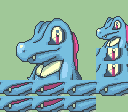
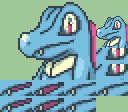
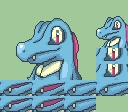
ReaderLuv's Vaguely Organized Art Stuff

WE GOT THE PERMS LESGO

The reason I wanted to join this forum was because I wanted to share some of the maps I made based on the levels in FEW; 3H. I started poking around the FEMapBuilder and such because I idly thought it would be neat to make at least Azure Gleam into functional actual FE gameplay, and so I started screenshotting the map layouts and seeing what I could do experimentally and realized it was fun as hell actually, so here’s what I have so far (as screenshots, because if the map editor has a way to export maps as images I have not found it yet lol)
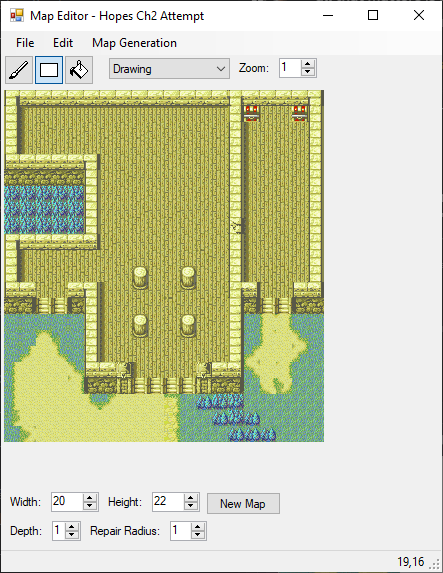
Hopes Chapter 2

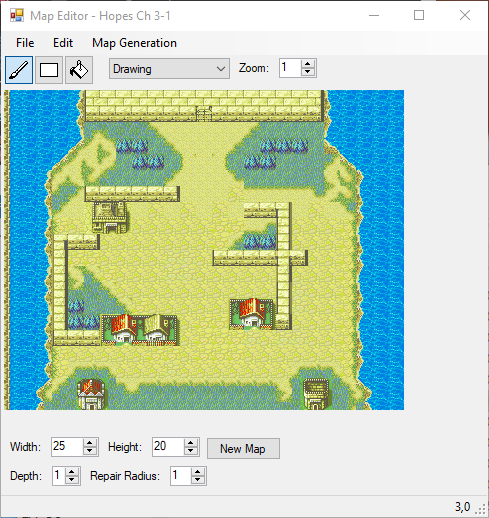
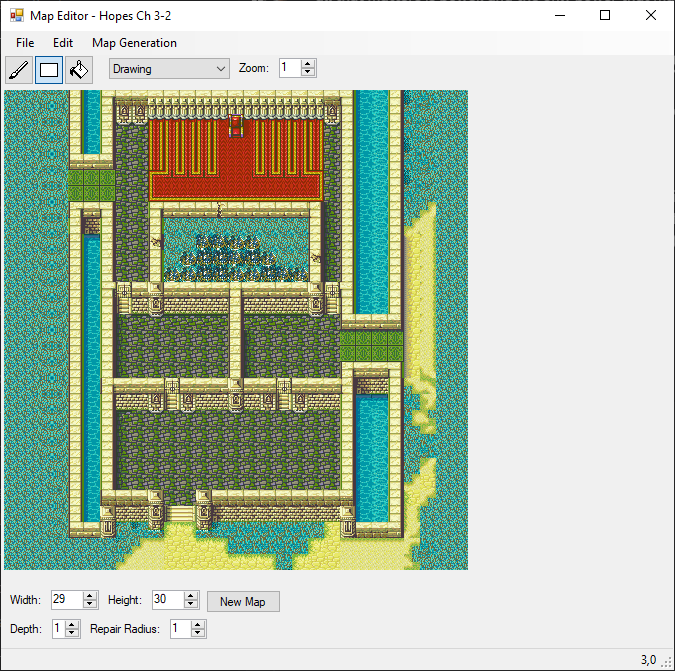
Hopes Azure Gleam Chapter 3

I split this one into two maps, since that made the most sense from a size perspective, a tileset limitation perspective, and also a “what would a game following the same story beats but in the style of a proper FE game on the GBA actually do here” perspective. They’re both somewhat works in progress because I’m messing around with details on 3-1 and I made 3-2 a bit wider near the end and haven’t resized and redecorated everything yet lol but the basic ideas are there.
Other experimental maps

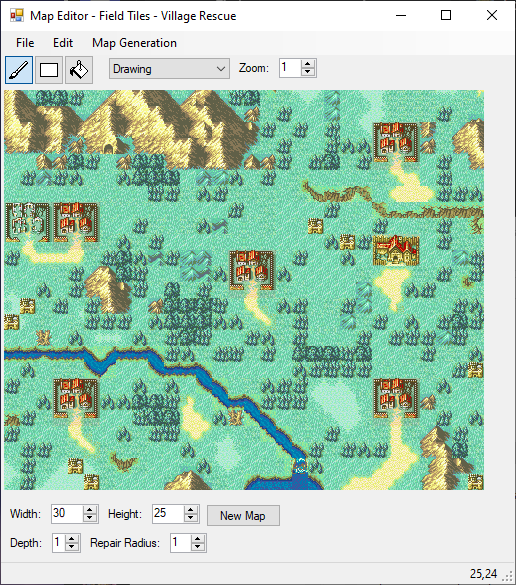
Field Tile Experiment - Village Rescue

So I’ll keep maps on this post, editing-wise, then I’ll make another post after this for the other little set of things I’ve been working on

5 Likes

And now we have project 2: animated talking Pokemon sprites!

I’m not sure why this hasn’t been done yet, and I’m the last person I’d ASK to do this job, but sometimes you discover things you’re good at in weird ways. I was noticing that a lot of Pokemon themed games on here were using what looked like sprites traced from 3D models, and I figured I may as well experiment to see if I could get the PMD sprites working in some way that might work for these projects, and it worked surprisingly well!

I’m not an animator by any means, I just know some of the basic concepts from watching animators talk about the process and examining animation sheets in gamedev stuff. A lot of my spriting is just playing frankenstein and Vibing™ until it looks good, but so far it’s been going pretty well!

Here are the kids I have so far, both in their original size and in a size closer to FE portrait sizes. I had to remove some of the anti-aliasing because these were originally meant to go on backgrounds and started out a bit blurry, but it wasn’t too tough. I may have missed a few pixels of shades that don’t belong in my excitement lol

EDIT 1: Added Meowth and Eevee and moved everything to dropdown boxes for space optimization lol

Original Size

Pikachu Basic

Meowth Basic

Eevee Basic

Chikorita Basic

Cyndaquil Basic

Totodile Basic

Treecko Basic

Chimchar Basic

Double Size (FE Portrait height)

Pikachu Basic Large

Meowth Basic Large

Eevee Basic Large

Chikorita Basic Large

Cyndaquil Basic Large

Totodile Basic Large

Totodile Edited

Treecko Basic Large

Chimchar Basic Large

EDIT 2: The process has risen in complexity due to the limitations of the FEGBA hackbox, but I’m working through it; here’s the size these portraits actually have to be, animated in the correct orientation, and the sprite sheets that would be imported into FEBuilder as they currently exist.

Properly Sized Animations

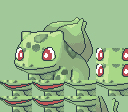
Bulbasaur Edited

Pikachu Edited

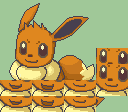
Eevee Edited

Chikorita Edited

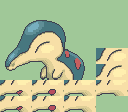
Cyndaquil Edited

Totodile Edited Again

Treecko Edited

Chimchar Edited

Sprite Sheets

I still need to make them blink, and I have no idea if these would actually function in place of FE portraits without a lot of work because the dimensions are different and I don’t fully know how all of the tools available handle sprites, but I figure I could at least mess around and find out what I could do. Edited for Learning More About How This Works. Stay tuned for a possible rendition of Sacred Stones but everyone is a talking Pokemon still though, lol.

Extra Edit: These are F2U and F2E! Please credit me ofc :3

5 Likes

Pikachu, Chimchar, and Treecko have small enough mouths that they can probably be made to work if placed correctly. Tototototototototototototototo, though… that long, crocodillian snout is not gonna do them any favors on that front. Not moving the upper jaw is a good call for that purpose.

Ah, cool, see, I’m learning. I did think something along those lines but it’s nice to have it confirmed. I’ll have to look into that more myself eventually, even if the process is mildly overwhelming, lol

Alright, having looked at the dimensions for how the talksprites seem to work, I would have to do some alterations to get Totodile to work but it would mostly just be a matter of having its mouth open a little less wide, I think? I’ll experiment later today since I have work lol but for now, I come bearing More™!

Meowth Basic

Meowth Basic Large

Eevee Basic

Eevee Basic Large

Two excellent Normal-types I hold close to my heart. Time to edit the original post to have dropdown menus for big and small ones lol

1 Like

Alright! After examining how the FE mouth sprites seem to work, I altered Totodile so that the mouth movements fit in the correct space, although I might have to alter it again depending on what the spacing for where the mouth animation tiles go is

Totodile Edited

It’s not exactly anatomically correct, but it doesn’t look too bad at least.

And while I was at it, I did Chikorita and Cyndaquil! Round out the trio, and everything.

Chikorita Basic

Chikorita Basic Large

Cyndaquil Basic

Cyndaquil Basic Large

Cyndaquil might need some tweaking but it’s hard to make an animation for a sprite that starts out with no mouth lol

The Gen I starters all have big wide reptilian mouths so I gotta check and see what space I have to work with on them, but I’ll probably do that next.

1 Like

Decided to mess around with trying to import these, and realized that eye size is a much bigger issue than mouth size, so I might just not be able to make them blink. The issue of mouth SPACING is its own issue, that does appear to be An Issue; I’m going to have to study up to figure out exactly where the breakpoints are and see if I can mess with the sprites to make them work.

As for maps, the next map I have to make for the Azure Gleam route of Hopes is a goddamn lava level lmao and the existing lava pools on the lava tilesets are… mildly inscrutable, with only a few fairly limited existing examples in the games for me to work off of. The generative tools don’t seem to know what to do with the lava pools, either, so maybe I’ll just make some generic maps for a bit, mess around with things, etc. Who knows, lol.

1 Like

Alright, since I ran into trouble with recreating the lava level in Azure Gleam, I figure the best way to get the ol’ creative juices running would be to just go through all of the available tilesets and make some random stuff using the generative tools. Excellent algorithm, btw, having a great time with it.

First up, I figured a field-based map would make the most sense, so I thought of a quick prompt for myself and got to work. In this case, I wanted to try recreating one of my favorite vibes, which is “race to all the villages as fast as you can”

The general idea is that you start on the left, near the ruined village, and work your way to the gate village where the boss is, who’s the goal of the chapter, and you get rewards at the end for how many villages you visited in addition to the rewards for visiting each individual one. There are a number of similar missions in the series, and this map’s size would mean it would be best in the midgame, after you’ve gained access to at least a second flier since there’s two directions you would need to go.

I also have no idea if this is a healthy number of trees, there were actually originally more that the generator put in but I tried to make clearish paths to each village. I’d have to playtest it to be sure lol and I have not actually done any putting of maps into FEBuilder to try out. There’s a few places where bandits could spawn from after a set number of turns, or depending on how many villages you’ve saved maybe? No idea if that’s actually a thing you can program but it seems like it would be neat lol

I’ve already technically done a village and a castle, so the next tileset I want to use is probably going to be the fort or plains maybe? Gotta come up with some kind of fun idea or theme for the level, we’ll see what we can do

So! After a bunch of experimentation, I have discovered a very large issue with the talking Pokemon project. It is as follows:

When importing this file to FEBuilder with FE8 open –

This happens:

And when moving Bulba over to the other side to try and account for this, there’s a similar gap on the other side, and after looking over various official portraits, I realized that dead space is where the space above human shoulders usually is.

Now, I have no idea WHY this dead space is here or how it works or how this program reads images. I still am extremely puzzled about how the hell exporting a battle animation, which as far as I can tell are made in full real space, results in a goddamn jigsaw puzzle and a bin file I don’t know how to read or open. I have looked up tutorials and either I’m stupid and am looking in the wrong places or it just has not come up. Is this one of those things people take for granted because it’s everywhere and they just don’t ever explain to people??? I am so confused.

Anyway, since Pokemon don’t have shoulders, I thought this project might just be dead, and then I was like “no c’mon. you can do this it’s just going to take more work” and so… here is the more work in question.

Before the problem solving:

aaaaand after!

Originally, I just resized them exactly doubled, which let the pixelation just be twice as big and it looked fine. But if I want to work around this shoulder space issue, I’m going to need to resize by partial steps and then deal with the artifacting, which is SO MUCH MORE WORK, BUT!

It worked. And it doesn’t look half bad, if I do say so myself! It looks like I messed up the placement of the mouth frames a little bit, but I can fix that up in a jiffy and it should be fine. We’re learning quite a lot through this, lol!

EDIT: Almost forgot, but this is the little guy properly in motion. Not bad!

Totodile Edited Again

1 Like

yeah that specific rectangle (and the one opposite it) is Not Within The Hackbox. Bulbasaur is screwed, but as you see, more vertically-oriented pokémon may be fine. and IDK if the hackbox extension patch covers that much space.

Lmao, I was just commenting to my friend about how Bulbasaur was next on the list for giving me trouble on this, I think there MIGHT be a way to make it work if I’m creative about proportions but that’s a problem for tomorrow (or more likely the next day since I have to work tomorrow lol)

EDIT: almost forgot, do tell me about the hackbox and the expansion patch thereof, I want to learn as much as I can about this

So I was correct that it IS a lot of work. BUT. I did manage to get another one done! Gotta edit the organizational post to include the sprite sheets and edited gifs after this, but here’s Chikorita!

Chikorita Edited

I had Bulbasaur worked on to a degree, but I messed up when saving and lost him. He’s tricky regardless due to the width issue, as mentioned previously, and I’d have to know more about how much the hackbox expansion thing actually improves the available space, because you CAN conceivably lower him in the frame and shrink his bulb a bit to make it fit a slightly smaller space, but it’s still an extra 16x16 square I’d need for it to be anywhere near passable. This is a much bigger project than I imagined it would be, but I’m having fun! Hopefully other people like these, once I get a solid collection going I’ll probably try to add them to the repo so everyone can use them. I need to figure out minimugs at some point, but I’ll save that for after the main chunk of work is done; best to focus on one thing at a time lol

3 Likes

So, what you’ve run into here is a thing called the hackbox. And we do actually have quite a lot of guides that mention it, both for Builder use generally and for portrait-making specifically, but with the sheer volume of resources out there (some of which are uh. not as good as others) and the amount of stuff covered in said resources, it can be easy to miss. I cover it in this post of my FEBuilder FAQ here:

That post also talks about the exceed hackbox patch, a way that you can get some of that space back! It’s a really useful patch, though still somewhat restricted.

In terms of tutorials to look at more generally, my FAQ is at this point the primary and most comprehensive FEBuilder reference source around – it’s linked in Builder itself as the online manual, having taken the place of its original docs, and I can say with reasonable certainty that most questions new users will have are answered in it somewhere. That said, it admittedly can be hard to navigate if you don’t know what you’re looking for – it’s written as a series of answers to specific questions and problems, made to be searched when you’re stuck, moreso than a structured tutorial. For a more structured long-form tutorial, I can also recommend Parrhesia’s “How to Excel at Builder Without Being Good At It”, which is a proper beginner’s guide and probably the current best overall place to start when new.

4 Likes

Lol you may notice that I did discover what it was called and once I knew that I found out that it did get mentioned a fair amount more than I realized, but I genuinely appreciate the in-depth breakdown. I’m someone who gets frustrated when I don’t understand how things work because I’m notmally pretty good at figuring it out! Lol

Even just two extra 16x16 spaces should be enough to get Bulbasaur working so I appreciate the explanation about how the exceed hackbox mod works especially!

I’m glad my project here is getting attention from people, I’m having fun with it

I DID IT.

Bulbasaur Edited

HE SPEAKS.

Thanks once again for the tutorial on the hackbox, I believe I have made it such that it does in fact work when done correctly. I have yet to test it lol I had a long day at work and wanted to do art not testing

Originally Cyndaquil was next, actually, to round out the Johto trio, but learning about the expansion made me want to actually finish this since I’d made a bunch of progress and then lost it like I mentioned before. NOW it’ll be Cyndie’s turn though, I’ve gotten a start on it and everything; its body gets cut off a similar way to Bulba’s but in a way I can finagle into the hackbox with a bit of creative problem solving. This really has been such a fun learning experience for me lol

4 Likes

… so are these F2U or F2E?

Oh right I SHOULD specify that now that there are enough of them. It’s kind of weird because I want people to use them but it would feel weird for people to use them while I’m still working on them but eh. I’ll go edit the initial post to indicate they’re F2U and F2E

4 Likes

Two more for ya!

Pikachu Edited

First up is Pikachu! I’m actually not super confident in this one, I had to scratch a lot of stuff since originally both ears AND the tail were cut off, and I’m not super sure I shaded everything correctly. I tried more directly drawing over this one, too, which means it’s overall just one of the ones I’m the most worried about in terms of what people will think. Still, at scale it looks good, so maybe that’s all that matters.

And second:

Eevee Edited

Eevee! Had to do some heavy reconstruction on this one, too, but I did less outright redrawing on it so I’m a little more confident in the shading for the most part. Wanted to do these two as a set since they go together in my mind 80% of the time.

6 Likes

dam another pokeartist is here really hope my favorite boys in shuppet and banette become chosen one day but amazing jobs on the pokemon. Alem would be proud to see em.
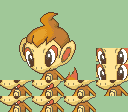
Actually @AlemOwl come look at the cool pokemon stuff.
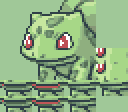
2 Likes

Yeah, I have seen these a while ago, and they’re pretty nice. Even if you stick only to the ones made officially for the first PMD games, there are a good amount of characters you’ll end up making portraits of. I do remember one guy doing a few of these a long time ago (he’s literally named Nobody), I wonder what he’s doing now. He also did them in a similar style to the games they appeared in, unlike for the ones I did which are closer in style to the ones from official FE GBA art.

Can’t wait to see which ones you end up making later, and maybe see how you try making Riolu and Lucario, even if I already did portraits of them. You could also make eye frames for these ones since some of them have small enough eyes to be able to close them properly.

Uh and also @Shadow_the_halberdier I already did a portrait of Shuppet a few months ago, right around May, if you wanted one btw.

1 Like