Hi, I’m kinda new using febuilder so, I was wondering, how I can add more classes to FE6? I’m trying to make a romhack in FE6 and I really need to add more classes, do I need to learn hex for example to make it possible? Btw I’m using the untranslated game
It’s possible in FE8 due to the ExModularSave patch. If you want class extension in FE6/7 you could use ExModularSave as reference to write a version for FE8, and then potentially have to change a couple of functions where it reads a half-byte to read a full byte instead.
But no, it’s not the sort of thing you can easily do with just pressing a button. If you’re not willing to learn more advanced topics such as “hex”, ASM and EA, you should make do with existing class slots. If you are, though, I suggest starting by reading GBAFE Assembly for Dummies, by Dummies, experimenting with FEBuilder’s Disassembler and looking into ExModularSave’s implementation with Event Assembler.
EDIT: And I guess it’s just proper to recommend hacking FE8 instead, if what you’re making is a custom hack rather than a reskin of FE6/7, due to already having the possibility you want, more functionality in vanilla and much more support with patches and documentation.
well, it’s in a reskin of FE6, but I don’t know which classes I could replace so I will check that link you sent
There are definitely unused slots such as the female cavalier, paladin and mercenary. Also, female armored and wyvern units are visually identical to the male versions with slight stat differences.
I don’t understand something about the link you sent, I read it all but i still don’t know how this will work to add more classes
He told you to code it yourself and linked you a tutorial on how to get started with fegba coding
If you can’t code I answered this elsewhere.
The classes not to use was for FE8
For FE6 do not replace the dragon classes, any of them [can replace divine dragon and fire dragon classes if you don’t use manakete (not manakete classes they are hard code to use tf animations)]
Do not replace demon dragon
Do not replace ballistia
The rest should be okay
ah, lol
I’ve expanded the classes in FE6 through FEBuilder before a long time ago, but it broke the Arena. Trying to enter just cancels the action, though everything else has worked for me. As far as my limited-knowing self can tell, expanding the class table deleted (or moved?) the following procs in my hack:
690F00
691190
690E88
690EC0
691138
691148
6911AC
69130C
6913FC
I know 6911AC involves the arena, but I don’t know anything about how procs are read by the game, so I don’t know how to link any of it back up if I wanted to repair them. (I don’t need to, I wasn’t using it)
That being said, I tried again on the FE6 translation version 1.1.3 with the newest FEBuilder and the procs seem intact and the Arena works. So…I dunno, maybe that’s coincidence and something else broke, but it may be worth checking out after all and my own hack got unlucky trying it too early. If you want to try yourself, make a clearly named backup of your hack and apply the class extension to 127 (unless you really need a hundred classes, though I don’t think the proper patches exist in FEBuilder for classes beyond that number). The option is invisible unless you reenable it in FEbuilder’s options. Then, test test test! Test every aspect you can think of with high class IDs and make sure everything in a playthrough is correct! You don’t want to work on your hack seriously and find out something really bad is broken.
Most importantly, listen to the other posters. I’m just one guy who doesn’t know the ins and outs of class extension side effects. If they say not to trust the class extender, then it’s prolly better to believe them.
I should note if classes are not expanded, but just replaced, you will need to fix arena enemy table, however builder has a menu for that and it’ll be pretty easy.
Also as far as I can tell depending on patches, I think melee and magic patch specifically, won’t allow you to use the patch that allows moving sounds to be changed.
I can work with that, since I’m going to disable the arena for my hack so. How you did it?
the two best ways are to use the map editor to replace all the arena tiles on the map or if you still want the arena tile on the map change the terrain type of the arena tile to whatever fits best, in either case I think forts work best.
The Arena? What I’ll do is make the menu option not even show up. In the Advanced Editors menu, there’s a Menu Commands button. In there, changing the Arena’s “Usability routine” to 801AD4D will force it to never appear. Like this, the Arena as a map tile can still be used or repurposed.
oh, I was referring to how you expanded the classes :V
Ah! To make the setting appear, go to Settings > Options and then under the Function 2 tab, set “Toggle Class Expansion Button” to 1=Displayed. Then, you can go to the usual Class menu and there’ll be a Data Expansion button at the bottom of the list of classes. Click it and it’ll warn you about ExModularSave and Moving Map Animations, which you shouldn’t need to worry about so long as you leave the classes at 128. Click yes and the next menu may look like a lot, but you only need to do two things: set “Total number of new data to allocate” to 128 and click the big “relocate data and repoint” button.
You should now have 52 new class slots to work with. I recommend testing things with the highest numbered classes since those are the ones that are most likely to be a potential issue.
thx, I will test it as soon as I add more classes and characters
Hey, I’m having the same problem as the one who made this thread, I want to import some custom animations to make my re-play feel more refreshing. But it’s just so tricky when FE6 doesn’t have the “Character Custom Animation by EA Table Editor” like FE8 (Why haven’t someone made it for FE6? Maybe not enough people care for this game?)
You seem to know the way to work around. 14 classes to add new animations in seem good enough. But how do you do it though? Like I can think of maybe Wendy’s class of female knight can be cut, but does it affect Wendy stats in any way?
Can you elaborate for me?
@MalePegasusKnight Let me help you out in this specific question with screenshots on top:
There is a FE6 hack that I found called Lyn’s Bizarre Adventure, and yes it is a PME and its kinda funny that I’m using a PME as example, but it did actually seem to have managed to implement an extended class list; 128 compared to vanilla’s 76.
The list on the left is vanilla FE6, while the one on the right is Lyn’s Bizarre Adventure:
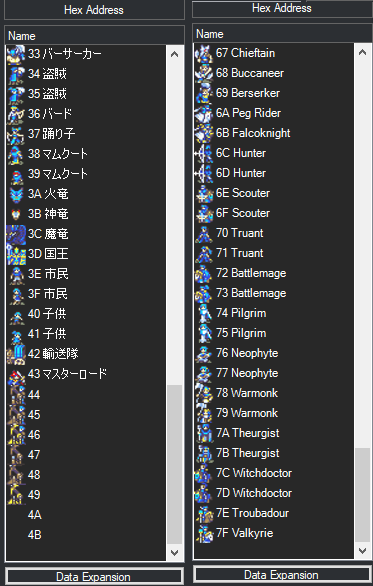
Reading more on the posts in the topic, it seems that you only need to expand the class list then make custom classes for the unique animations for the units (like in your Wendy’s case).
If the “Data Expansion” button does not appear for you in FEBuilder, all you need to do is go to Settings → Options → Function 2 → ‘Toggle Class Expansion Button’ to 1=Displayed.
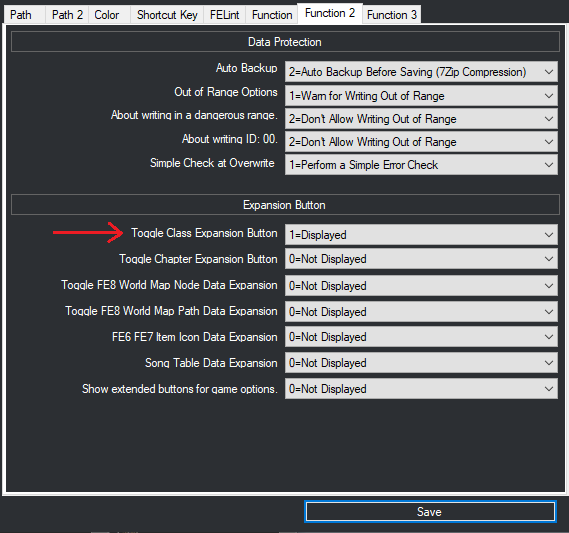
By the explanation from FEBuilder’s document, the option is disabled by default since directly extending the class list can lead to game breaking bugs and glitches, but I believe again by reading the posts from the author, that the current version of FEBuilder can expand the class list and it will work, but only up to a certain limit (since LBA uses 128, this might be the limit).
Then simply copy and paste Wendy’s Armor Knight class ID (make sure to correct the ID information on the stats page, it will appear as a red box so it’s hard to miss), then go to the animations editor to tick the box that makes her animations independent from vanilla F!Knight, and finally you’re good to go in regards to custom animations for Wendy.
Now of course, in vanilla I believe Wendy is the sole user of the F!Knight class, so you could simply directly edit her class animations so she has unique ones, in this case this answer is if you are planning to give custom animations to more units (like for example Dieck, who uses the very common M!Mercenary class, then do the same above for him).
Let me know if you need help with anything else, I might be able to help in this regard.
The female classes were used a few rare times in FE7 on random enemies, but I don’t know if FE6 ever did that. It’s something to keep in mind.
As for making sure Wendy’s stats stay the same while switching her to the male Knight, you’d have to compare the difference in stats between the two classes and add that difference to Wendy’s personal character stats. Though, it would likely only be a few points of difference.
Good point, and as the Armor Knight’s map sprite is very easy to spot, it should be easy to do a quick check on Unit Placer to see if there’s any generic F!Knight enemies in chapters.
Edit: Well now, look what I found!
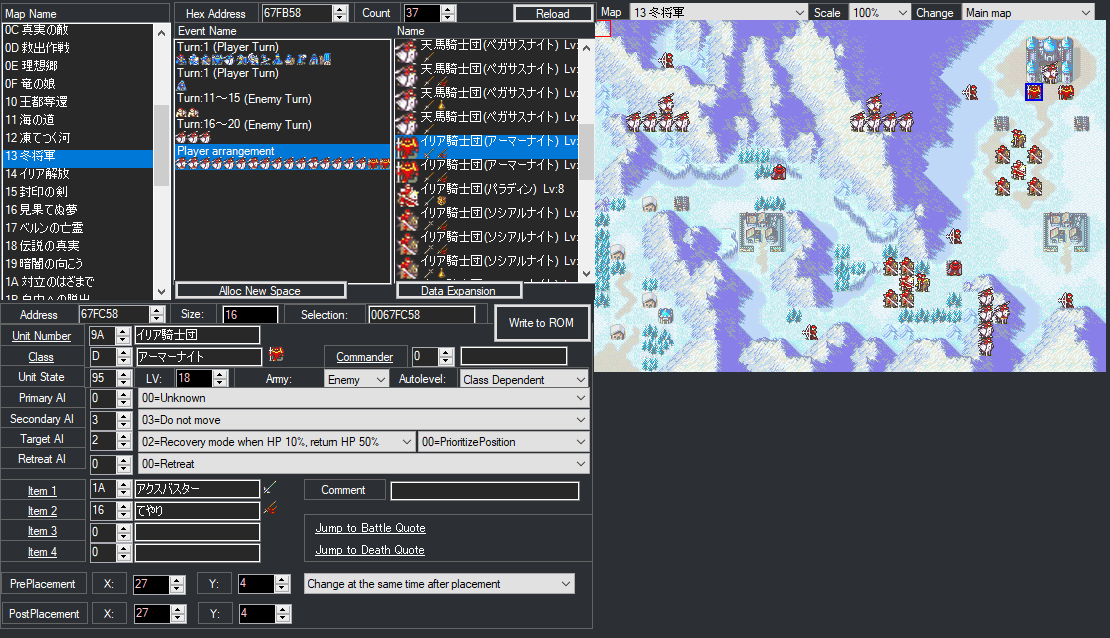
These two Armor Knights at the northeast corner of the map in Ch 19 - Bitter Cold (Ilia) have the second Knight class (0D), the same as Wendy’s, so they’re actually female knights! I honestly never even knew that before lmao.
What a find. So there’s definitely a few hidden different classes among generics even in FE6.