The debugger now has the ability to analyze the currently playing background music from the emulator’s SoundBuffer, track by track, like sappy.
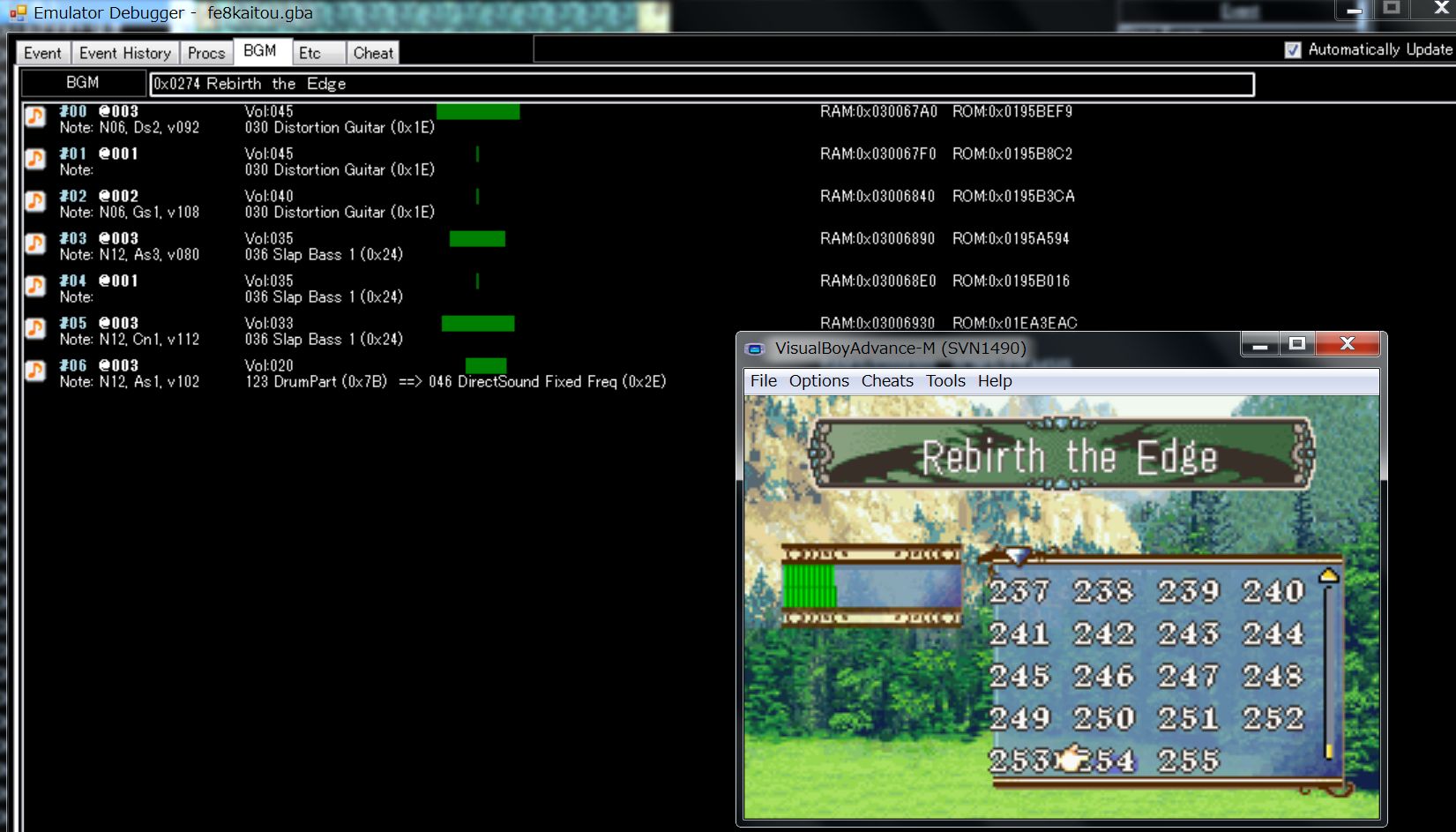
This feature is based on the work of Huichelaar’s Adaptive BGM.
What you can do.
-
You can view the currently playing background music by track.
-
Shows the name of the currently playing instrument or measure.
-
Like sappy, you can mute each track.
Double-click or press enter to toggle mute settings.
It has the following advantages over Sappy:
-
very Accurate.
Because the sound is played back on an emulator, you will hear more accurate sounds than with sappy. -
measure display.
You can display the exact measure number of the point you are currently playing.
sappy only gives you the address, but this way you can see the measures in the file, which makes it easier to identify where the problem is. -
being able to display the name of the instrument
You can display the name of the instrument that is currently playing.
In the case of drums, you can also display the name of the drum instrument. -
no need to run sappy
sappy can be unstable, so not having to rely on sappy is an advantage in itself. -
can use emulator’s frame skip
Although sappy also has a fast-forward function, emulator frame skipping is a more powerful weapon.
Compared to sappy, it has the following drawbacks:
-
Doesn’t know chords.
The SoundBuffer only records the last note played.
Therefore, you can’t tell if you are playing a chord. -
Update frequency is 1 second.
This is because the data is retrieved from the emulator every second.
There is a delay of about 1 second compared to sappy. -
Cannot get BEND MOD.
You cannot get the BEND and MOD defined in the track. -
Cannot play favorite sound.
This is because the this function is looking at the value of the emulator’s BGM that is currently playing.
In other words, you can only see the sound that is playing in the game. -
Duplicate instruments will show the instrument ID of the one used only the first time.
This is because the SoundBuffer records the instrument data, not the instrument ID.
Therefore, it is necessary to reverse engineer the currently playing instrument ID from the instrument data.
If more than one identical instrument data is registered in the instrument table, the first data found will be displayed.
This may result in a discrepancy with the instrument ID used in the score. -
When you mute a track, the volume display also goes to 0.
In sappy, the volume is still displayed when you mute a track, but in this method, when you mute a track, the volume is set to zero, and so is the volume display. -
The volume display may shift a little.
Even if the left and right sound balance is correct in sappy, it may be different in the emulator’s SoundBuffer.
The cause is unknown.
If you want to adjust the PAN, it is better to use sappy. -
no seek bar compared to VGMusicStadio.
There is no seek bar because the emulator gets the currently playing sound.
There is no seek bar in sappy either, but VGMusicStadio has a seek bar.
However, since it uses the emulator, you can use frame skip instead.