Hello everyone at FEU. How are you? I hope you’re well.
Despite FEU’s rules allowing posts with AI-generated images, as long as they use the “AI” tag, and being classified as F2U/E content for those who wish to use it, not all users would like to see these posts appearing on their timelines here.
Browsing through my account’s preference settings, I discovered that there is a way to filter these posts so they no longer appear for you. So, just like me who didn’t know this until recently, here are the steps:
1)- Have an account (obviously)
2)- Click on your user icon and go to the Preferences section.
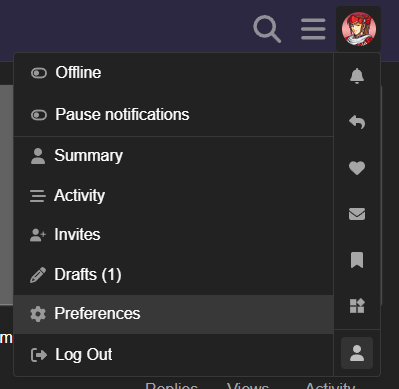
3)- Click on Tracking and scroll down.

4)- In the Tags section, go to the Muted section and type “AI” (or / and any other tag you also wouldn’t like to see, for any other reason) to make it appear and click.
5)- And lastly, click the Save Changes button at the bottom of the page.
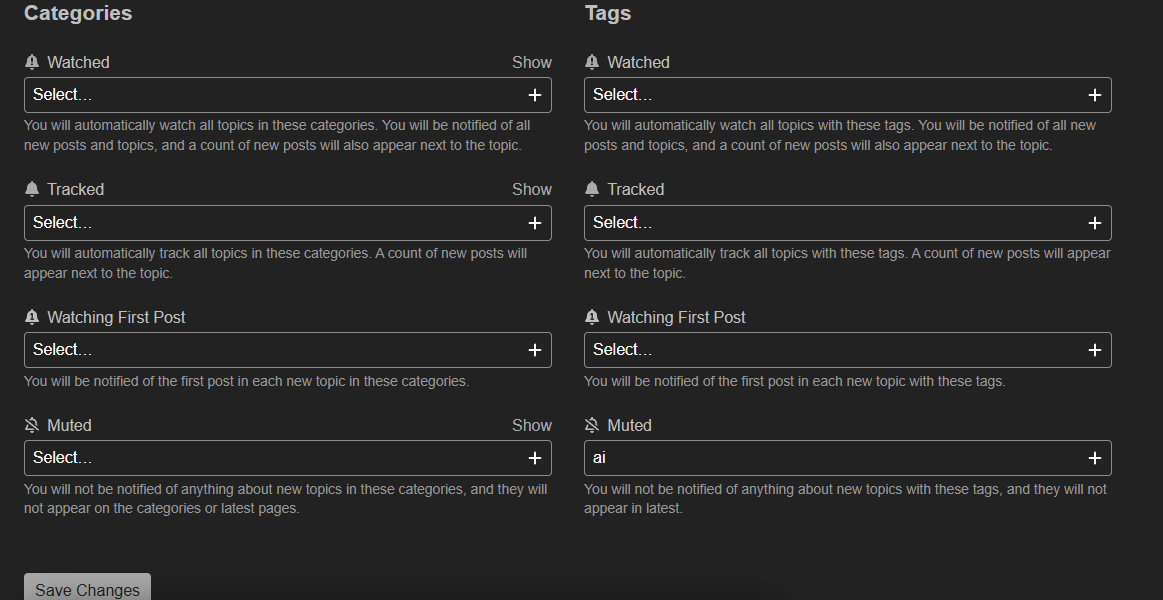
And that’s it, no other posts with those tags will appear in your feed anymore.
I want to make it clear that, although I disagree with those who actually want to continue using and posting this type of content here, this is in no way a personal attack on any or specific person.
I hope this helps anyone who was interested.
Until next time.