@MalePegasusKnight Let me help you out in this specific question with screenshots on top:
There is a FE6 hack that I found called Lyn’s Bizarre Adventure, and yes it is a PME and its kinda funny that I’m using a PME as example, but it did actually seem to have managed to implement an extended class list; 128 compared to vanilla’s 76.
The list on the left is vanilla FE6, while the one on the right is Lyn’s Bizarre Adventure:
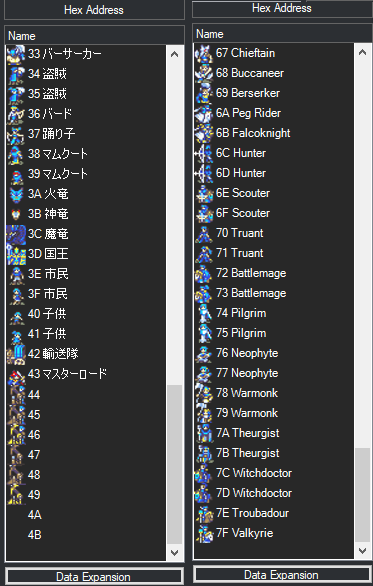
Reading more on the posts in the topic, it seems that you only need to expand the class list then make custom classes for the unique animations for the units (like in your Wendy’s case).
If the “Data Expansion” button does not appear for you in FEBuilder, all you need to do is go to Settings → Options → Function 2 → ‘Toggle Class Expansion Button’ to 1=Displayed.
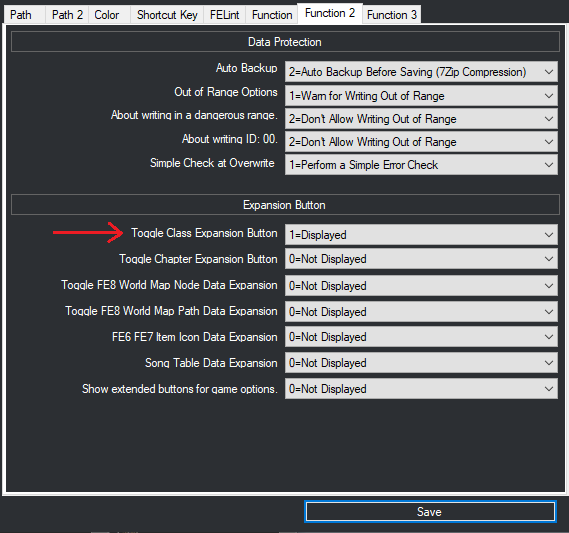
By the explanation from FEBuilder’s document, the option is disabled by default since directly extending the class list can lead to game breaking bugs and glitches, but I believe again by reading the posts from the author, that the current version of FEBuilder can expand the class list and it will work, but only up to a certain limit (since LBA uses 128, this might be the limit).
Then simply copy and paste Wendy’s Armor Knight class ID (make sure to correct the ID information on the stats page, it will appear as a red box so it’s hard to miss), then go to the animations editor to tick the box that makes her animations independent from vanilla F!Knight, and finally you’re good to go in regards to custom animations for Wendy.
Now of course, in vanilla I believe Wendy is the sole user of the F!Knight class, so you could simply directly edit her class animations so she has unique ones, in this case this answer is if you are planning to give custom animations to more units (like for example Dieck, who uses the very common M!Mercenary class, then do the same above for him).
Let me know if you need help with anything else, I might be able to help in this regard.