Shame it’sn’t available for vanilla, but cool to see anyways.
1 Like
Hey. I was testing the latest version of this, and I noticed that Items that have a Use, like Vulneraries, are still able to be used while at 0 uses.
Would it be possible to add a check for Items so that they can’t be used when they have 0 uses?
EDIT: This is also a problem with Staves. Staves at 0 durability that are set to not break can still be used.
Will take a look, thanks for bringing this to my attention.
1 Like
Hello everyone, happy International Hack Release Day!
I’ve been thinking a lot about UI lately. Part of game design involves what information the game tracks is conveyed to the player, and this is vital in Fire Emblem where combat can be headcalced and small variations in numbers make a huge difference. Intelligent Systems knows this and presents Attack, Hit, Avoid, Crit as solved battle stats in the equipment box in GBAFE, and future entries will display Attack Speed, Dodge, and Protection/Resilience as well.
But one stat IntSys never chooses to display is growth rates. They never want players to know how likely their units are to increase a stat on level up. This drastic yet consistent policy has forced our hands, or so is implicitly argued by the nigh-ubiquitous inclusion of growth display in hacks. With a press of a button we can peer at the underlying growth rates of our units and know exactly how on par with their averages they are or which of them are secretly lacking in potential.
I consider this a gross overreach on the part of hackers. Growth rates are supposed to be suspenseful and fun, and knowing exactly how a unit grows ruins the mystique of it. “Ah, my romhack soldier gained a point of skill and defense on this level up; that puts her on average in skill while now -1.5 on strength-” Statements dreamed up by the utterly deranged. Yet IntSys’s position on growth rates is also wrong. When you don’t know how a unit growths, how can we be accurately amazed when they hit their 5% resistance growth?
Presenting Growth Grades.


No longer will pressing Select display a unit’s exact growth rates, it will display a grade corresponding to how high the unit’s growth in that stat is. It removes the knowledge of exactly how a unit stacks up to their contemporaries while retaining the hype around unexpectedly hitting a low-graded growth. In other words, a cooler and more aesthetically pleasing version of color-coded growths.
Download link: asm/GrowthGrades at main · GigaExcalibur/asm · GitHub.
Setup and configuration (if for some godforsaken reason you want to use this):
0.Use SkillSys. This hack is only remotely possible because of MSS and will not work without it.
1.Go to EngineHacks/Necessary/ModularStatScreen/pages. If not using the strength/magic split, open mss_defs.s. If using the strength/magic split, open strmag/mss_defs.s.
2.Scroll down to the draw_growth_at macro and replace it the macro written below.
.macro draw_growth_at, bar_x, bar_y, list
  mov     r14, r0        @r0 = growth getter to bl to
  mov     r0, r8
  .short  0xF800        @returns total growth in r0, base growth in r1

  mov	  r1, \bar_x
  mov 	  r2, \bar_y
  mov	  r3, \list

  blh	  DrawGrowthGrade
.endm
3.Open the proper page1_____.s file for your project configuration.
4.Scroll down to the ShowGrowths label and replace it the section written below. The contents assume you’re using the strength/magic split and have not changed the stat positions; tweak the numbers in each draw_growth_at call if need be.
ShowGrowths:
ldr		r0,[sp,#0xC]
ldr		r0,[r0,#4]		@str growth getter
draw_growth_at #17, #3, #0
ldr		r0,[sp,#0xC]
ldr		r0,[r0,#8]		@mag growth getter
draw_growth_at #17, #5, #1
ldr		r0,[sp,#0xC]
ldr		r0,[r0,#12]		@skl growth getter
draw_growth_at #17, #7, #2
ldr		r0,[sp,#0xC]
ldr		r0,[r0,#16]		@spd growth getter
draw_growth_at #17, #9, #3
ldr		r0,[sp,#0xC]
ldr		r0,[r0,#20]		@luk growth getter
draw_growth_at #17, #11, #4
ldr		r0,[sp,#0xC]
ldr		r0,[r0,#24]		@def growth getter
draw_growth_at #17, #13, #5
ldr		r0,[sp,#0xC]
ldr		r0,[r0,#28]		@res growth getter
draw_growth_at #17, #15, #6
draw_textID_at 13, 17, textID=0x4E9, growth_func=1 @hp name
ldr		r0,[sp,#0xC]
ldr		r0,[r0]			@hp growth getter (not displaying because there's no room atm)
draw_growth_at #17, #17, #7
b		NextColumn
.ltorg
5.Save the file and drag it over AssembleLynEvent.bat. You should encounter no errors in assembling, ask me for help if you do error.
6.Place the growth grade files elsewhere in your buildfile and #include GrowthGrades.event. This file contains a copy of these instructions and the growth grade thresholds for you to customize.
7. Each stat has a corresponding list. If the growth for that stat if less than or equal to the first column, it will draw the ui symbol whose index is in the second column and the ui symbol whose index is in the third column one tile to the right. There are included definitions for the vanilla weapon rank labels and plus/minus signs, but it supports all ui symbols if you want to get goofy with it. ❥❥ for growths over 100%, anyone?
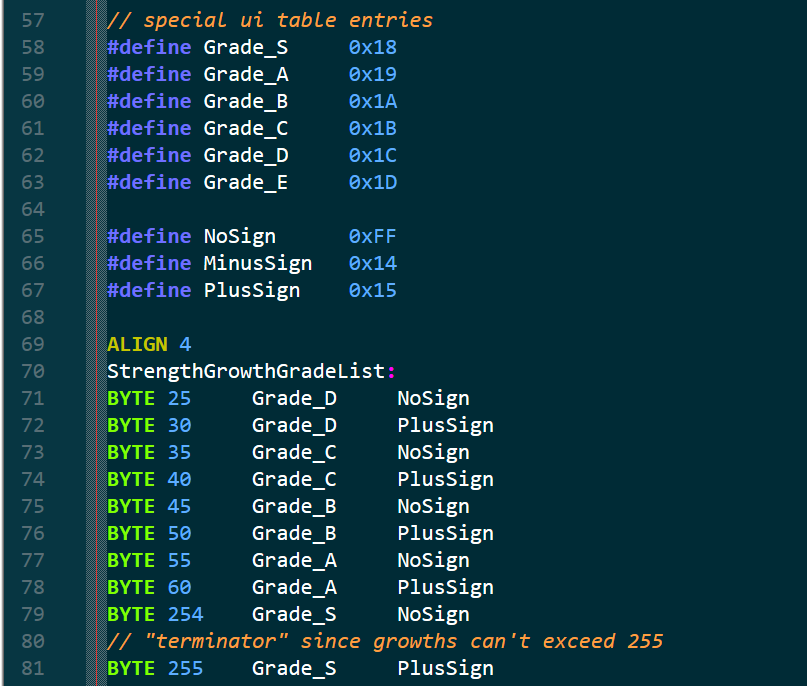
The default thresholds are based on vanilla growth rates. The highest non-Myrrh growth in the stat is assigned a grade of A+ and the grade goes down one rank every 5%. If you do intend to use this system, I highly encourage you to find an interesting grade scale for your project’s growth rates.
That should be all! Please ask me questions about the system if needed, as this is the most involved installation process for any of my hacks. Have a wonderful International Hack Release Day.
21 Likes
how can you make this as esoteric as possible?
1 Like

This looks AWESOME.
Here’s what I plan for the Rank thresholds in my hack:
E 10%
E+ 20%
D 30%
D+ 40%
C 50%
C+ 60%
B 70%
B+ 80%
A 90%
A+ 99%
S 255 %
With this setup, It would show S rank if a unit has at least 100% in a growth rate. Correct?
1 Like
Correct.
1 Like
Love your reasoning behind this - agree wholeheartedly. One of the better aesthetic hacks I’ve seen. Thanks for sharing.
1 Like
I regret to inform you that my reasoning was, as we say, comically exaggerated for the bit. Still, glad you enjoy!
1 Like
Good evening everyone! Quick inline change that makes it so the map or preps theme is not interrupted by visiting armories or shops. This change has always been on my to-do list but I only recently learned how to parse proc code.
PUSH

ORG 0xB4C06 // no longer start armory bgm on initializing armory
SHORT 0x46C0 0x46C0
ORG 0xB4C10 // no longer start shop bgm on initializing all other shops
SHORT 0x46C0 0x46C0

ORG 0xA391A8 // no longer fade map music out on entering shop
BYTE $0E $00 $01 $00 $00 $00 $00 $00

ORG 0xA39430 // no longer fade shop music out on exiting shop
BYTE $0E $00 $01 $00 $00 $00 $00 $00

ORG 0xA391E8 // no longer restart map music from the top on exiting shop
BYTE $0E $00 $01 $00 $00 $00 $00 $00

POP
#include in a buildfile or Insert EA with FEBuilder. Let me know if there are any cases I neglected to consider, and have a great day!
6 Likes
Hype!!! Love this
1 Like
Hey guys! Nothing strictly new tonight, just a polish for an ancient hack I made.
One of the first hacks I ever made was the “Age Getter,” an extraordinarily simple hack allowing users to create a new table of unsigned bytes in ROM indexed by unit id and get the value at a given index. This original version was:
- Inflexible. The table was read as unsigned bytes, and thus only values from 0-255 were supported.
- Shallow in functionality. While the table and getter did work, you couldn’t get a unit’s age in events, only from the direct function.
- Poorly documented. Anything written in assembly is unreadable by default and I put no effort into making it easy to read or edit.
- Improperly flavored. It was pointed out to me that character ages are an extremely niche use case and people could use this for any extra character byte they wanted.
My new version fixes all of these flaws. The code is now flavored as “Hidden Stat,” it’s been rewritten in C, includes the ASMC GetUnitHiddenStatASMC that returns a unit’s hidden stat in sC, and now supports values from -128 to 127.
Download link: asm/HiddenStat/HiddenStat.c at main · GigaExcalibur/asm · GitHub
#include HiddenStat.event in a buildfile or Insert EA with FEBuilder. The original version of Age Getter will stay up for the sake of archival but is now considered deprecated.
That’s all, have a wonderful night!
8 Likes
Finally
I can now have bar crawling in my hack without allowing for underaged drinkers
1 Like
I’m back for the third time in a row with a small feature made at the request of a friend. Introducing Fixed Soft Weapon Locks.
FEBuilder’s version of Skillsys is supposed to come with the Soft Weapon Locks system, which allows for weapons like DSFE Excalibur where its required rank to use differs depending on whether its wielder matches the weapon’s lock. But the system is bugged and no one’s really had the use case to want it to be fixed.
I have not fixed the bug in FEBuilder Skillsys but I did write the feature independently. My version comes with a table indexed by weapon id that determines how much weapon exp is needed to wield that weapon when a unit has the matching lock. An entry of 0 wexp in this table means that the weapon’s lock remains “hard” like vanilla.
Download link: asm/SoftWeaponLocks at main · GigaExcalibur/asm · GitHub
Notes:
- This hack is INCOMPATIBLE with Skillsys, Auto-Refreshing Weapons, Weapon Lock Array, and any other hacks that hook the function
CanUnitUseWeapon. - Use the macro
SoftWeaponRankEntryinSoftWeaponLocks.eventto set wexp requirements for each weapon id. The proper weapon lock(s) must still be toggled in the item attributes field for this hack to do anything. - Insert
SoftWeaponLocks.eventwith EA when done. You can use this in a buildfile too but I believe there are no bugs with soft weapon ranks in Skillsys master (and if there were, this wouldn’t be an adequate replacement).
That should be all. Let me know if there are any bugs, and have a wonderful day!
10 Likes
Good evening everyone! Tonight’s kind of a big one that I’m really excited to share.
Introducing the Lord Split Menu Plus.

The Lord Split Menu is one of the most powerful tools hackers have access to in unique campaigns, entirely due to Nat’s excellent documentation on and modularization of the mechanic. But while Nat’s thread is a godsend, it’s not quite as comprehensive as it could be:
- The thread leaves out several elements of menu options that could be useful to a modular Lord Split Menu, namely R-text for menu options and the ability to make some options unselectable under certain conditions.
- The end of the thread presents all of the code as assembled hex data, which is completely unreadable and discourages users from potentially editing the source code.
- Each menu defined through Nat’s method requires a unique ASMC to call it. They recognized this and left generalizing the ASMC as an exercise for the reader at the end of the thread, an exercise I’m sure no one but me has done.
My version opts to fix each of these. It includes functionality for R-text and conditional usability, it’s entirely written in C, and all menus are called using the same CallMenu() event macro.
Download link: asm/LordSplitMenuPlus at main · GigaExcalibur/asm · GitHub
Usage notes:
- This hack does not hook any existing functions and is thus inherently compatible with everything!
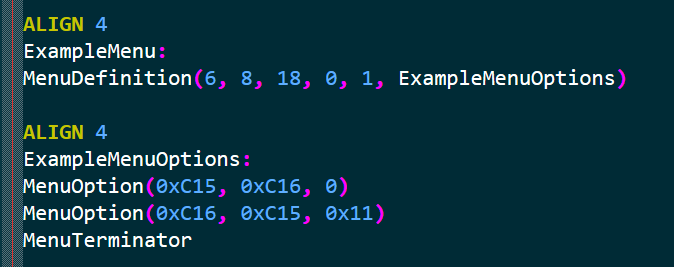
- Define menu structure with the macro
MenuDefinition()under a label. You can define a menu’s x-position, y-position, width, height, tileset, and its set of menu options. - Define menu options with the macro
MenuOption()all under one label. You can define an option’s name, description, and the flag that must be set for the option to be selectable. A flag of 0 will make the menu option always enabled. - Call your new menu with the event macro
CallMenu(menu), wheremenuis the label defined in step 2. FEBuilder users will likely need to substituteCallMenu(menu)withSVAL s1 menu|0x8000000; ASMC CallChoiceMenuASMC|1. - When done,
#include LordSplitMenuPlus.eventin your buildfile or Insert EA with FEBuilder.
That should be all! I’m actually really proud I was able to do this and hope someone makes use of its extra features and streamlined elements. Thank you so much for reading, and have a wonderful night!
15 Likes
Introducing Ultimate Modular Item Healing.
You’ll uh, forgive me the hyperbole here. Item healing values are notoriously hardcoded in vanilla GBAFE: healing staves have hardcoded bases further hardcoded into specific item id bundles; vulneraries have a special execution function with an extra parameter specifying the healing amount… but this function is only ever called with the hardcoded value of 10 instead of a variable.
There have been many efforts and patches to change this over the years. There are inline changes for the heal amounts of vulneraries and staff groups, there are patches that allow for the creation of new vulneraries or staves in a list, and the Item Effect Revamp modularizes the system of item usage and effects allowing for easy completely custom item routines. But despite all of these new bells and whistles, item healing formulas have always felt so rigid to me. Specifically, I hated that all staves linearly scaled with the cleric’s magic, as it meant a competently-statted cleric could usually coast through the entire game restoring enough HP with just Heal or Mend.
I was initially going to release this hack as just “all staves use Mt + Mag/2,” but that felt just as rigid to me as the 1 * Mag system I disliked. I didn’t want this hack to exist a potential option for alternative item healing formulas, I wanted this to be all the options for item healing formulas. What does this mean?
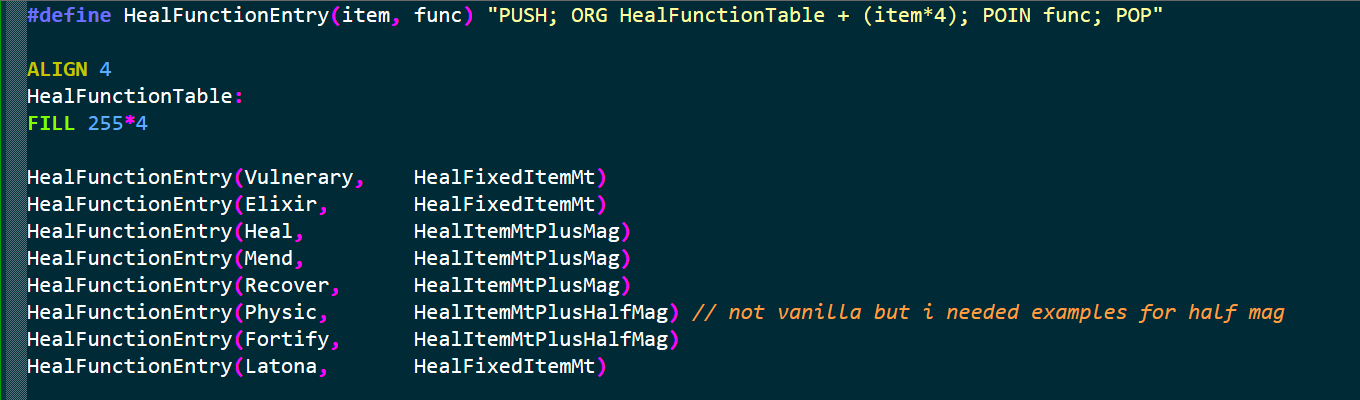
With this hack, every healing item in the game can be assigned a unique formula for determining its healing amount. This lets you do silly stuff like make staves fixed-mt or vulneraries scale off of magic, as well as removing all hardcoding from vanilla healing systems. The functions HealFixedItemMt, HealItemMtPlusMag, and HealItemMtPlusHalfMag are included as default options but this table supports any custom routine that fits a specific function header (more on that below).
Download: asm/UltimateModularItemHealing at main · GigaExcalibur/asm · GitHub
Installation and Usage Notes:
- This hack works with or without Skillsys! If you are using the Str/Mag split you will need to go to EngineHacks/Necessary/MSG/Extensions/Strmag.event and change line 17 to
PUSH; ORG currentOffset+1;prMagGetter:; POP. - Use the macro
HealFunctionEntry()to assign an item a specific healing function. If an item does not have an associated function it will heal 1 HP as a default case. - Assigning an item a healing function here does NOT give that item a healing effect if it previously did not have one. It will only work for recovery staves, consumable heals, and any custom healing items defined through IER (if in use).
- Adding custom routines is very easy! The header for all healing functions here is
int MyHealingFunction(struct Unit* unit, int item)whereunitis the healer anditemis a healing item. - When done,
#include UltimateModularItemHealing.eventin your buildfile or Insert EA with FEBuilder.
Thanks to Zane, Cam, and Huichelaar with help on the specifics of typecasting functions. And that should be all! Let me know if there are any bugs, and have a wonderful day.
9 Likes
Hi! I’m just trying to use the Auto-Refesh Items patch (no skills systems) with FE Builder, and it installs and acts correctly. However, I’m not sure how to call the AutoRefreshItems ASM. I’m probably just missing something obvious, but if you could tell me how to it would be much appreciated!
1 Like
No worries! Calling the auto-refreshing ASMC is a little unintuitive in FEBuilder so I’ll walk you through the process.
When you insert AutoRefreshingWeapons.event, make sure the option to save a .sym.txt file is selected. This will generate a file called AutoRefreshingWeapons.sym.txt in the same location as the file you inserted.

That file should look like this, although the specific numbers next to each label will differ for your ROM. Find the number next to RefreshItemsASMC and copy it to your clipboard.

Then in your event, search ASMC in the command list and click “Assembler function is called.” In the box next to “Assembler function,” type 8 and paste the number you copied above. If you’ve done it right, it should preview RefreshItemsASMC@AutoRefreshingWeapons in the box.

That should be all! Let me know if you need any more help.
3 Likes
Works absolutely perfectly! Thank you.
1 Like