I see. Would it be possible to change that down the line so bith screens line up?
It’s possible, but it would have consequences outside of the level. As it’s currently implemented, all stat numbers are drawn 4 tiles away from their respective label in the case when animations are off. If I made the stats be drawn 3 tiles away instead, that would shift every number one tile to the left.
Adding an exception for Lv would be possible, but would require replacing the entire function and thus beyond the scope of a one-byte change.
Oh, and just in case this isn’t widely known. Numbers in GBAFE are almost always positioned from the perspective of the rightmost digit, so there’s no danger of two-digit levels going outside the boundaries of the UI.
2 Likes
Presenting: Auto-Refreshing Weapons
Strictly speaking this hack is out already, first introduced in campaigns like Cerulean Crescent and The Morrow’s Golden Country, but never had a public release before now. Hopefully this makes the code more accessible for anyone interested in its functionality!

This hack allows you to define a list of items that are “Auto-refreshing.” Auto-refreshing items do not disappear when their durability reaches 0 and have their durability drawn in gold in all instances. When the ASMC RefreshItemsASMC is called, all instances of auto-refreshing items in units’ inventories and the convoy are set to maximum durability.
Installation (NO Skillsys):
- Download the folder here: asm/AutoRefreshingWeapons/NoSkillSys at main · GigaExcalibur/asm · GitHub
- Configure the list and definitions in
AutoRefreshingWeapons.eventto your project’s specifications. #include AutoRefreshingWeapons.eventin your buildfile or Insert EA it with FEBuilder.
Installation (Skillsys)
- Download the folder here: asm/AutoRefreshingWeapons/SkillSys at main · GigaExcalibur/asm · GitHub
- Configure the list and definitions in
AutoRefreshingWeapons.eventto your project’s specifications. - Add
POIN ZeroDurabilityWeaponUsabilityto the END of the weapon usability calc loop. In theory it doesn’t have to be at the end for it to work, but in my testing it only works at the end so put it there. #include AutoRefreshingWeapons.eventin your buildfile or Insert EA it with FEBuilder.
This hack would absolutely not be possible without the assistance of Retina, who helped me bug fix and provided inspiration for the original version’s implementation in TMGC. Shoutout to the usual group of wizards who assisted me in this endeavor as well: Vesly, Contro, and Shuusuke.
If there are any bugs please bring them to my attention!
21 Likes
This is so cool!
I want to ask a few things:
Are weapons with 0 durability left still equipable? By the screenshot it seems not.
Would it be possible to edit this ASM to make “broken” weapons like FE4/FE5/3H? Which would have different stats than the base weapon. And also display a different icon.
Is it possible to edit the ASM event to make it so it refreshes a specific amount of uses, instead of the max?
For example: A weapon with this property has 20 max uses. And when the ASM is called, it gets +5 uses.
So if its at 0/20, it foes up to 5/20. And if it’s called again, it goes to 10/20.
1 Like
Correct, items at 0 durability are left unequipped in this implementation. But making FE4/3H-style broken weapons with different stats would be trivial to implement, although the weapon icon changing when broken might be more annoying.
The ASMC restoring a specific amount of durability is also trivial to add, and I will do so when I’m free today.
1 Like
Thank you so much!
When you do work on it, it would also be cool if you implemented an optional check for tomes specifically to be unequipable. While Physical weapons still being equipable. Because Drained Tomes in FE4/FE5 aren’t equipable, IIRC.
1 Like
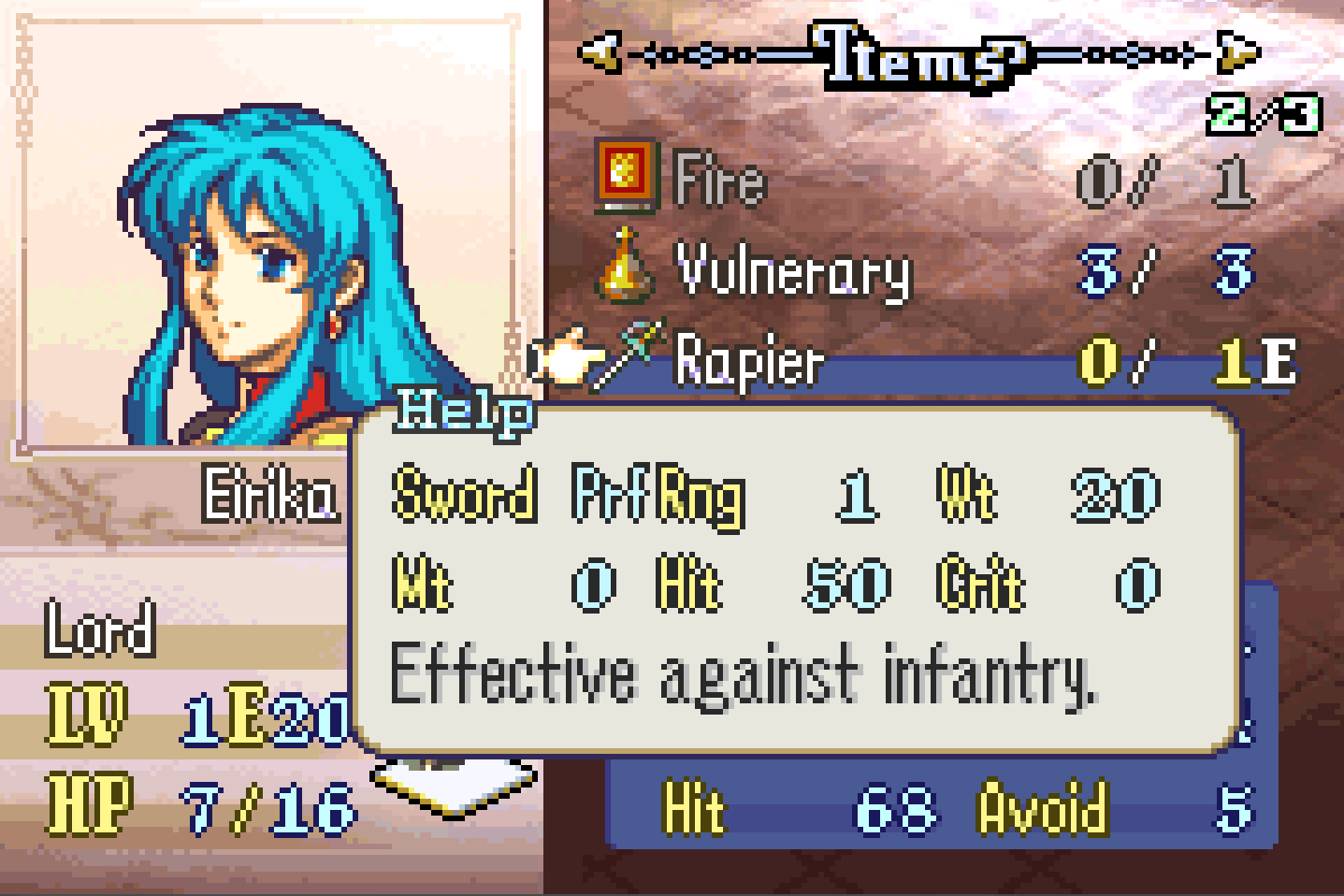
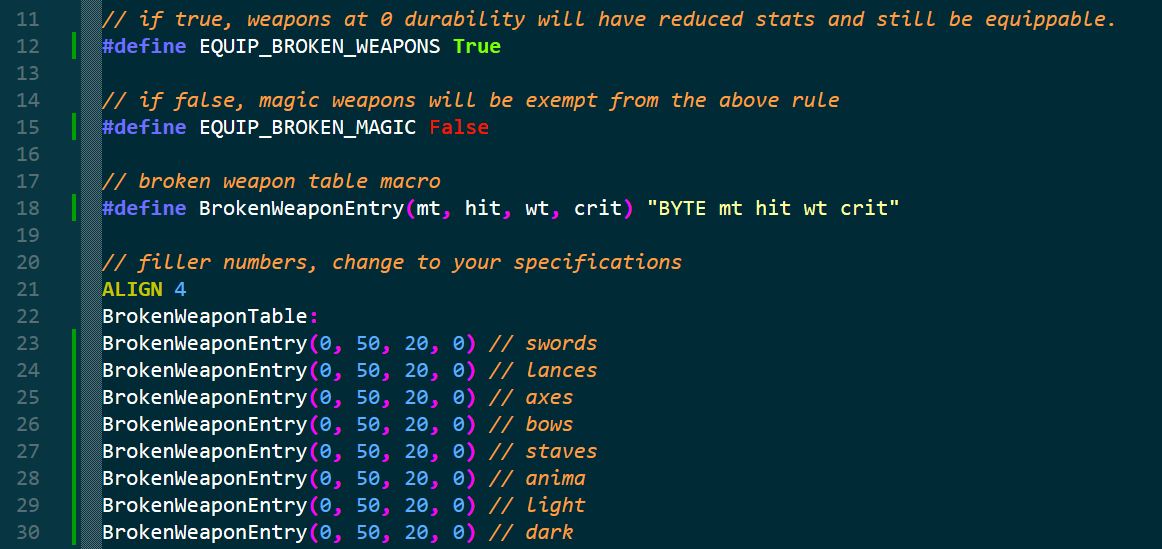
IT’S DONE. Trust me that Eirika has an anima rank in this screenshot. You can now define a table of broken weapon stats per weapon type, as well as toggles as to which kinds of weapons can be equippable even when broken. I also made it so you can specify the exact amount of durability to repair in s1 before calling RefreshItemsASMC. I also took this opportunity to clean up the code and the event file, so even if you don’t intend to use the new features it’s worth downloading the update anyway.
I wanted to make it so broken weapons also have a different name depending on weapon type but I ran into an unexpected snafu. Apparently when weapons are given in an event, their name is called in the popup before their durability is initialized. Had Eirika’s rapier not been given in an event I wouldn’t have caught this at all, but I was extremely dismayed to see Got Broken Sword! show up onscreen when I got the feature working.
I don’t want to touch popup code, and even if I did I’d have to account for Skillsys’s potential changes to the way popups work. So for the time being broken weapons will have the same name/icons as their repaired versions. Hopefully that’s okay.
Because of the scope of this update and the fact that I had to keep the Skillsys and no-Skillsys versions consistent, some bugs may have slipped through the cracks. As always please report any bugs you see!
Edit: OH ONE MORE THING. I guarantee that this update makes the no-Skillsys version of the hack incompatible with the Weapon Lock Array and any other patches that touch weapon usability. SkillSys users should be okay.
7 Likes
This is AWESOME! Thank you so much. I’ll definitely be using this in my hack!
A few more things: Is there a way to define Range in the broken weapon table macro? Because I think in FE4, Magic Swords would become just 1-range, becoming “drained” of their magic, I assume. And I think it also applied to throwing lances and axes.
And also, is it possible to call the ASMC for repairing weapons for only a specific Unit ID, or for an “active” unit in an event?
1 Like
I tried range in the table as well but there was something unique about the range getter functions I didn’t feel like figuring out in the moment. Certainly possible, though.
It’s also possible to add a check for unit ids, but my level of stress from looking at the code increases exponentially with the amount of nested conditionals and loops in it. I may implement it at some point but for the time being it’s not a priority. I apologize for the inconvenience.
1 Like
Maybe instead of defining the range on the table, you could make a separate block of code that defines:
If durability = 0, range is always 1.
If weapon is Bow, range is always 2.
Also, one last thing: What happens when a 0 durability weapon is sold? In vanilla, all items have their price set per-use. So what happens when there’s no durability left? Does it sell for 0?
And if it sells for 0, is there a way to code it so it sells for half the price of a 1 use weapon?
Example: iron Sword has 46 uses. Price is 10 per use. Total: 460. So a p use Iron Sword would sell for 5.
Or if that’s too complicated, maybe you could just define the broken price just for weapon TYPE in a separate table?
Oh, and also. Does the weapon broke! pop up still show up when a weapon reaches 0 durability?
The range on the table isn’t as much as problem as much as properly getting the range nybbles within the min/max/encoded range getters. I’m sure I could figure it out if I looked at it in more detail but at the moment I don’t have enough energy.
As for sell prices, items sell for half the price they were bought for by default. However, items that sell for 0 gold cannot be sold, so any weapon at 0 durability cannot be sold. I don’t particularly see the need to change this behavior and do not want to risk further incompatibility within this hack.
If this is a feature you desire, I encourage you to hook these functions yourself. They’re remarkably simple:
u16 GetItemSellPrice(int item)
{
    return GetItemCost(item) / 2;
}

bool IsItemSellable(int item)
{
    if (GetItemAttributes(item) & IA_UNSELLABLE)
        return false;

    if (GetItemSellPrice(item) == 0)
        return false;

    return true;
}
Lastly, there is no pop-up when a weapon breaks.
1 Like
I’m not really a coder, but I can ask a friend to help me with it. Thanks!
Another suggestion: I think weapons that have Stat Boosts (Such as Sacred Weapons) should have their stat boost disabled while they are at 0 uses (This is only practical if the weapon can still be equipped at 0 uses. OR, if it gives passive boosts regardless of equiping it, like Fates Rajinto). If you could add a toggle for that, it’d be awesome.
Removing stat boosts for broken weapons was also a consideration, but Skillsys already hooks the stat boost getter (for the sake of passive boosts and whatnot). Me adding it here would be yet another feature I’d need to keep consistent between Skillsys/non-Skillsys versions.
Small thing tonight. Introducing Classlocked Weapon Ranks.
Made at the request of Citrus, this hack slightly changes how weapon usability works. With this system you can now only use a weapon if your class has a base rank in that weapon type. You can see here that Eirika has the rank to use the Iron Lance but can’t because Lord doesn’t have base lance access. Her lance rank is grayed out to reflect this.
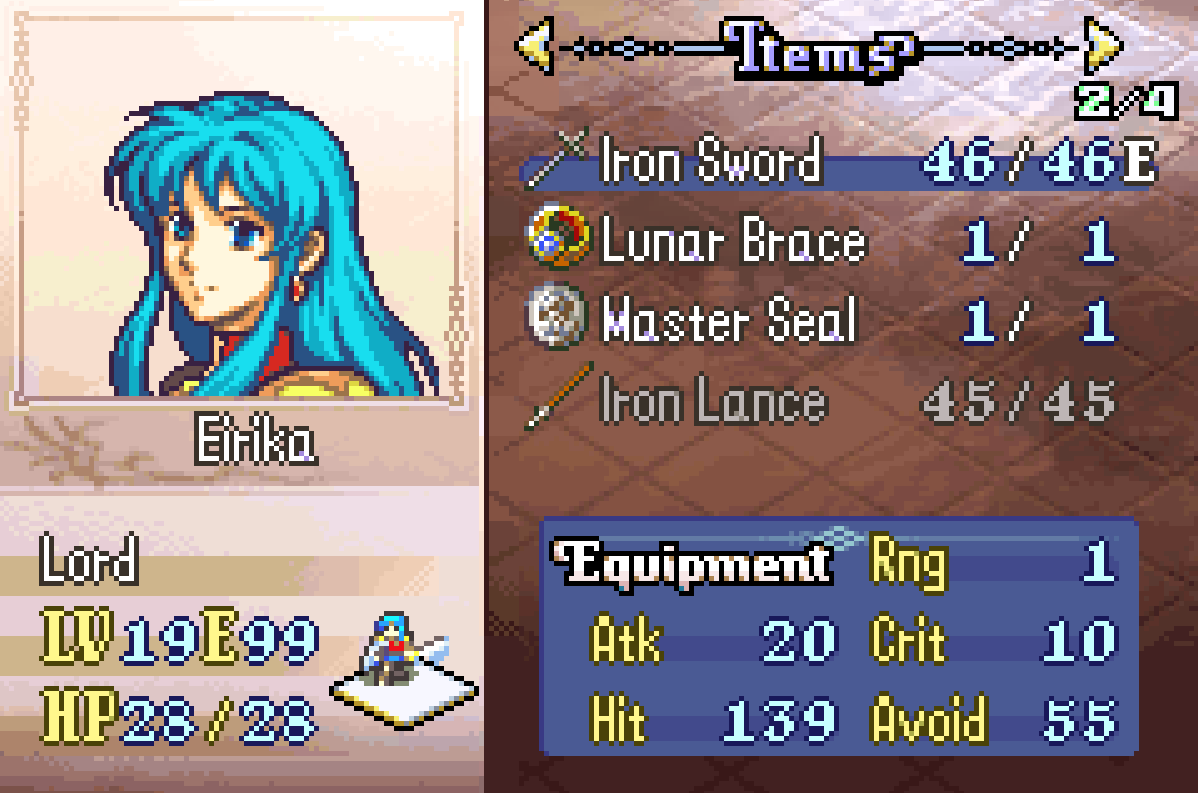
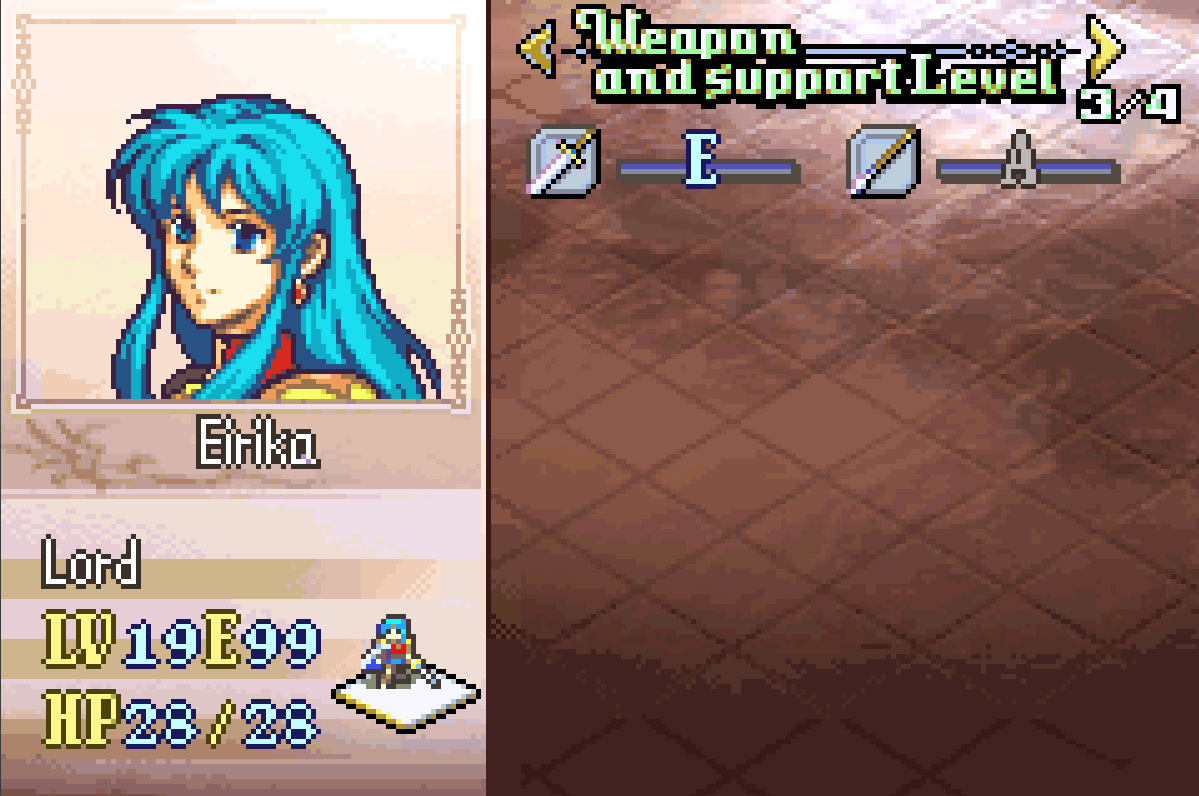
The two big use cases for this hack are dismounting and free reclassing, since both systems involve allowing and prohibiting a unit’s weapon type based on their class. I don’t predict people will use this but I wanted to put it out there anyway.
Skillsys-exclusive because I don’t particularly feel like touching CanUnitUseWeapon more than I already have. Download link: asm/ClasslockedWeaponRanks at main · GigaExcalibur/asm · GitHub
Installation instructions:
#include "ClasslockedWeaponRanks.event" anywhere in your buildfile.- Add
POIN ClasslockedWeaponUsabilityto the end of the weapon usability calc loop. It doesn’t strictly have to be at the end but I’ve experienced weirdness with prior hacks and have felt putting it at the end saves some headaches. - Enjoy! There’s not much to configure at the user end for this one.
That’s all, really. Have a fantastic night!
16 Likes
This seems like how engage does weapon ranks, seems cool though!
1 Like
Your prediction is wrong - I’m going to use this. Thank you: now I can have proper dismount straight out of FE3 (but with FE5 weapon ranks) without any compromises.
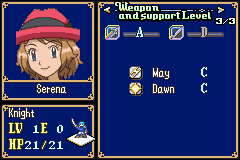
The only hiccup I ran into so far is there is no
ClasslockedWeapon label: I added one where I included the file and it works.
2 Likes
Oh, that’s my mistake. When writing the topic I meant to put POIN ClasslockedWeaponUsability instead of POIN ClasslockedWeapon but at 1:00 AM I didn’t feel like doing a second pass. Thank you for catching the typo and I’m glad you got it working despite that!
1 Like
Hello everyone! I just caught and fixed a very important bug in auto-refreshing weapons which prevented non-refreshing items from being thrown out of the unit’s inventory after breaking. Deeply sorry for this oversight, if you downloaded the earlier version of the hack please make sure to update.
If there are any remaining bugs please report them!
3 Likes
Introducing Weapon Avoid/Dodge.
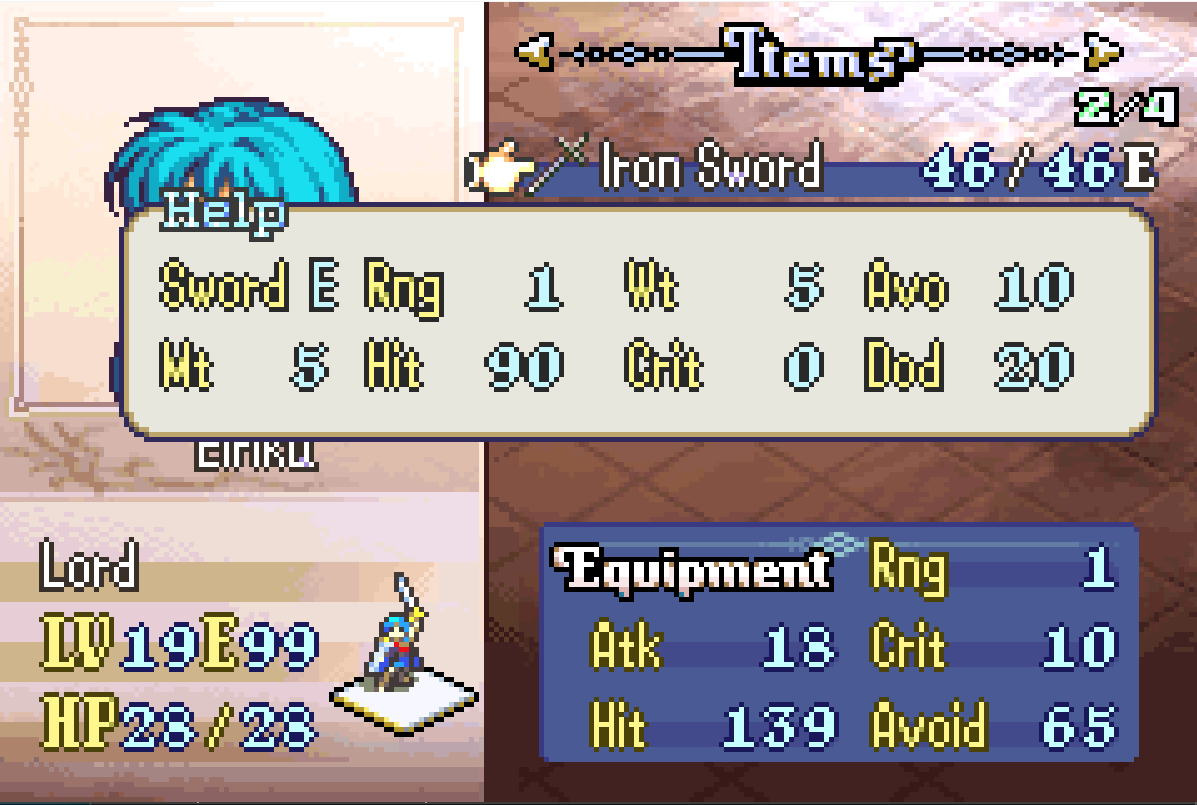
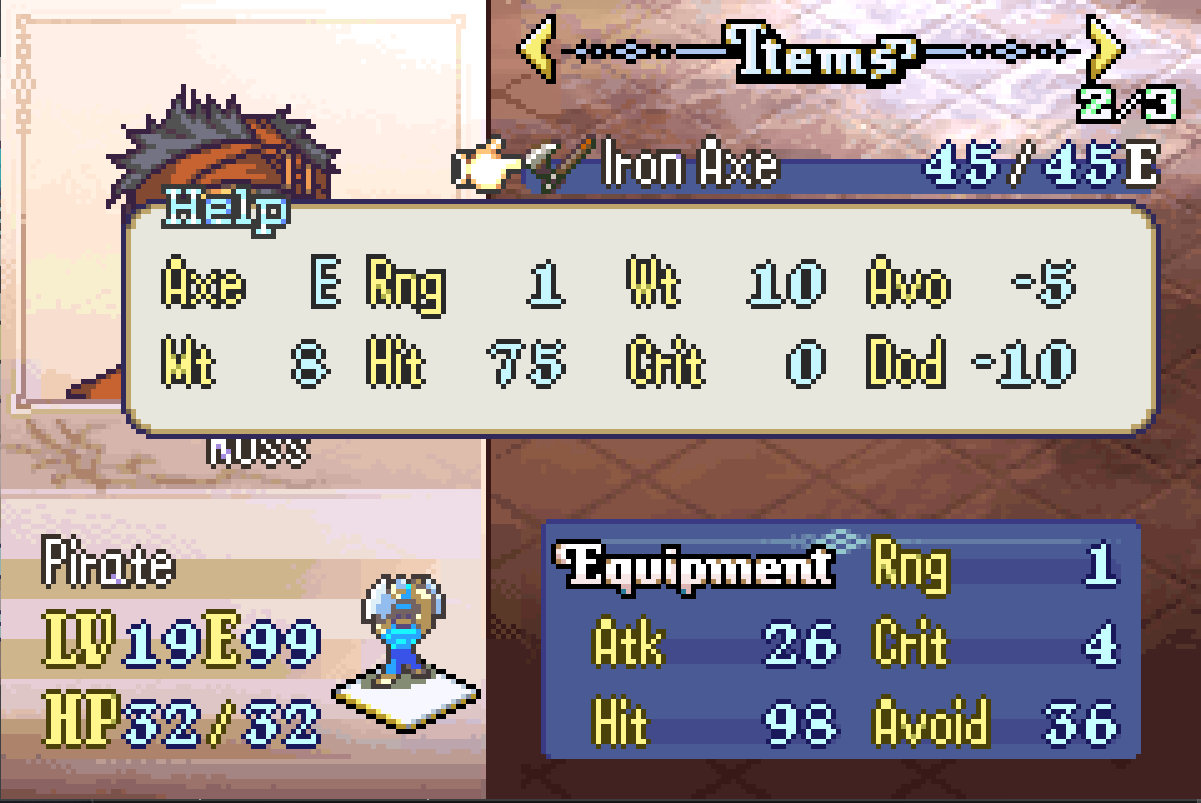
Exactly what it sounds like, this hack allows you to give weapons passive avoid and dodge bonuses a la Fire Emblem Fates and display those parameters in the weapon description. Avoid and dodge bonuses are signed, meaning values from -127 to 128 are supported.
Download link: asm/WeaponAvoidDodge at main · GigaExcalibur/asm · GitHub
This hack is Skillsys-exclusive since the battle unit dodge calculator is too small to be autohooked by Lyn. Sad! Anyway, installation and configuration details:
#include WeaponAvoidDodge.eventanywhere in your buildfile.- Create two text ids in your text folder named
AvoNameandDodName. These correspond to the labels in the weapon description. My personal preference is “Dge” over “Dod,” but “Dod” is how the stat is shrunken in MMB and so by default I’m consistent with that. - Add
POIN AddWeaponAvoidDodgeto the end of the prebattle calc loop. It should go after every other skill that affects avoid and dodge since the end of the function floors each stat at 0. - Configure
WeaponAvoidTableandWeaponDodgeTableto your specifications. Each are indexed by item id and any entry not set defaults to 0 avoid and 0 dodge. If both a weapon’s avoid and dodge bonuses are 0, the extra column in the weapon description is not drawn.
Credit to Ysor and Aura Wolf: the former for providing the first implementation of passive weapon avoid/dodge and the latter for their massive body of work on R-text. This hack is probably incompatible with their new R-text modules, unfortunately, though I encourage everyone to check them out! Thank you very much for reading! Have a wonderful day.
17 Likes
We love to see weapon r-text boxes getting bigger. Adding to my own game when I can.
1 Like