Hello everyone, happy International Hack Release Day!
I’ve been thinking a lot about UI lately. Part of game design involves what information the game tracks is conveyed to the player, and this is vital in Fire Emblem where combat can be headcalced and small variations in numbers make a huge difference. Intelligent Systems knows this and presents Attack, Hit, Avoid, Crit as solved battle stats in the equipment box in GBAFE, and future entries will display Attack Speed, Dodge, and Protection/Resilience as well.
But one stat IntSys never chooses to display is growth rates. They never want players to know how likely their units are to increase a stat on level up. This drastic yet consistent policy has forced our hands, or so is implicitly argued by the nigh-ubiquitous inclusion of growth display in hacks. With a press of a button we can peer at the underlying growth rates of our units and know exactly how on par with their averages they are or which of them are secretly lacking in potential.
I consider this a gross overreach on the part of hackers. Growth rates are supposed to be suspenseful and fun, and knowing exactly how a unit grows ruins the mystique of it. “Ah, my romhack soldier gained a point of skill and defense on this level up; that puts her on average in skill while now -1.5 on strength-” Statements dreamed up by the utterly deranged. Yet IntSys’s position on growth rates is also wrong. When you don’t know how a unit growths, how can we be accurately amazed when they hit their 5% resistance growth?
Presenting Growth Grades.
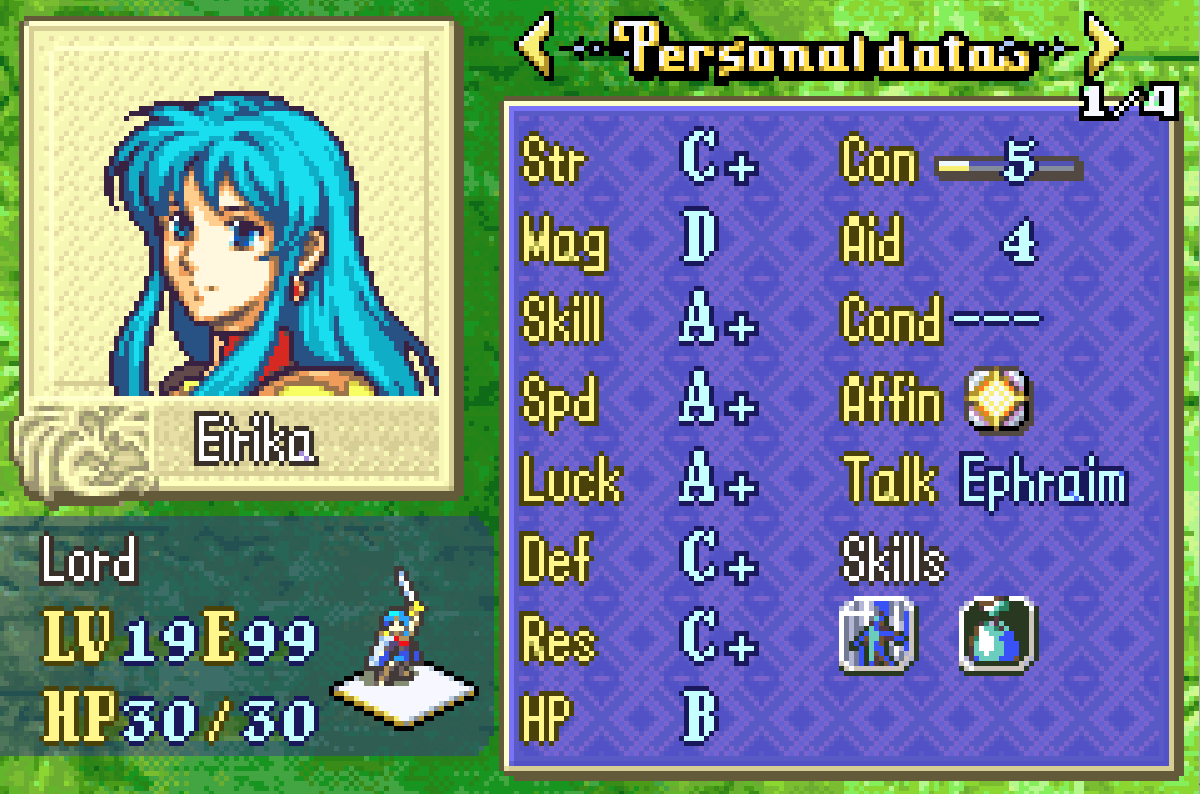
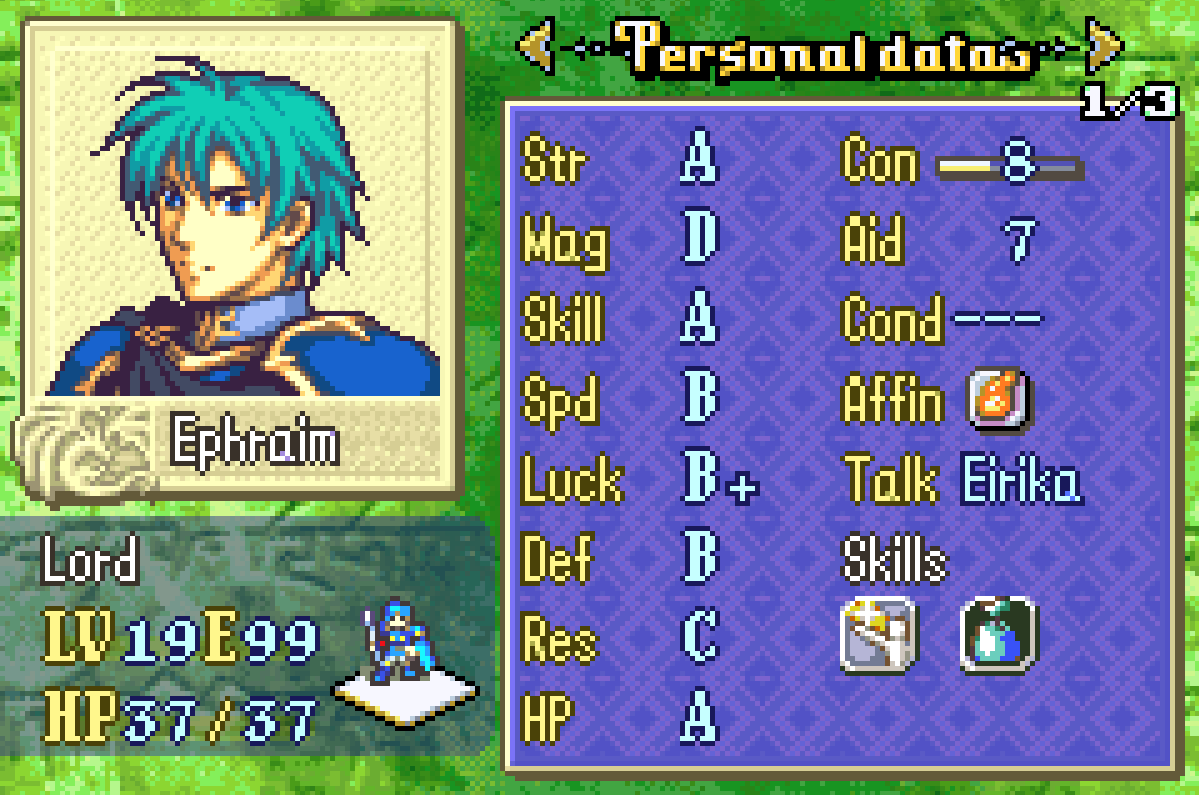
No longer will pressing Select display a unit’s exact growth rates, it will display a grade corresponding to how high the unit’s growth in that stat is. It removes the knowledge of exactly how a unit stacks up to their contemporaries while retaining the hype around unexpectedly hitting a low-graded growth. In other words, a cooler and more aesthetically pleasing version of color-coded growths.
Download link: asm/GrowthGrades at main · GigaExcalibur/asm · GitHub.
Setup and configuration (if for some godforsaken reason you want to use this):
0.Use SkillSys. This hack is only remotely possible because of MSS and will not work without it.
1.Go to EngineHacks/Necessary/ModularStatScreen/pages. If not using the strength/magic split, open mss_defs.s. If using the strength/magic split, open strmag/mss_defs.s.
2.Scroll down to the draw_growth_at macro and replace it the macro written below.
.macro draw_growth_at, bar_x, bar_y, list
  mov     r14, r0        @r0 = growth getter to bl to
  mov     r0, r8
  .short  0xF800        @returns total growth in r0, base growth in r1

  mov	  r1, \bar_x
  mov 	  r2, \bar_y
  mov	  r3, \list

  blh	  DrawGrowthGrade
.endm
3.Open the proper page1_____.s file for your project configuration.
4.Scroll down to the ShowGrowths label and replace it the section written below. The contents assume you’re using the strength/magic split and have not changed the stat positions; tweak the numbers in each draw_growth_at call if need be.
ShowGrowths:
ldr		r0,[sp,#0xC]
ldr		r0,[r0,#4]		@str growth getter
draw_growth_at #17, #3, #0
ldr		r0,[sp,#0xC]
ldr		r0,[r0,#8]		@mag growth getter
draw_growth_at #17, #5, #1
ldr		r0,[sp,#0xC]
ldr		r0,[r0,#12]		@skl growth getter
draw_growth_at #17, #7, #2
ldr		r0,[sp,#0xC]
ldr		r0,[r0,#16]		@spd growth getter
draw_growth_at #17, #9, #3
ldr		r0,[sp,#0xC]
ldr		r0,[r0,#20]		@luk growth getter
draw_growth_at #17, #11, #4
ldr		r0,[sp,#0xC]
ldr		r0,[r0,#24]		@def growth getter
draw_growth_at #17, #13, #5
ldr		r0,[sp,#0xC]
ldr		r0,[r0,#28]		@res growth getter
draw_growth_at #17, #15, #6
draw_textID_at 13, 17, textID=0x4E9, growth_func=1 @hp name
ldr		r0,[sp,#0xC]
ldr		r0,[r0]			@hp growth getter (not displaying because there's no room atm)
draw_growth_at #17, #17, #7
b		NextColumn
.ltorg
5.Save the file and drag it over AssembleLynEvent.bat. You should encounter no errors in assembling, ask me for help if you do error.
6.Place the growth grade files elsewhere in your buildfile and #include GrowthGrades.event. This file contains a copy of these instructions and the growth grade thresholds for you to customize.
7. Each stat has a corresponding list. If the growth for that stat if less than or equal to the first column, it will draw the ui symbol whose index is in the second column and the ui symbol whose index is in the third column one tile to the right. There are included definitions for the vanilla weapon rank labels and plus/minus signs, but it supports all ui symbols if you want to get goofy with it. ❥❥ for growths over 100%, anyone?
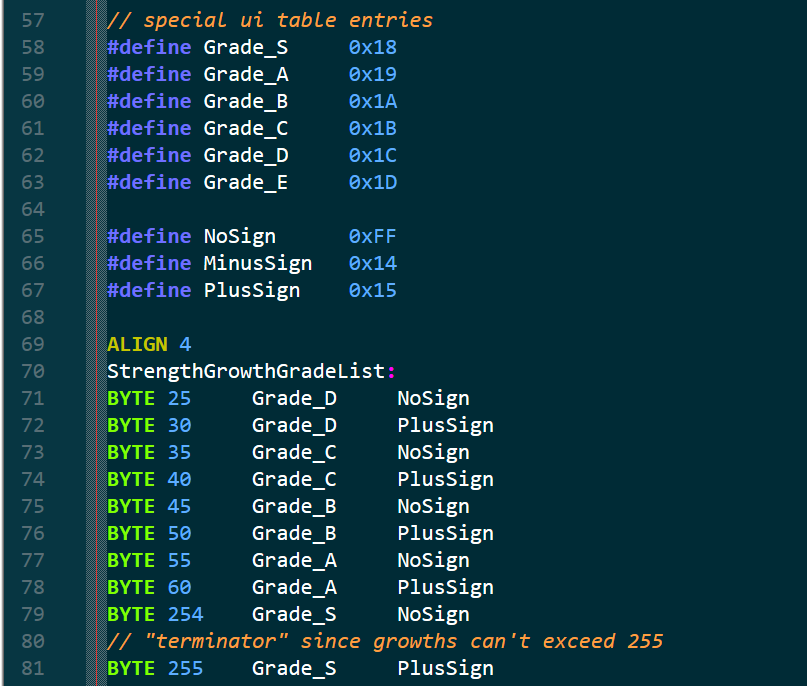
The default thresholds are based on vanilla growth rates. The highest non-Myrrh growth in the stat is assigned a grade of A+ and the grade goes down one rank every 5%. If you do intend to use this system, I highly encourage you to find an interesting grade scale for your project’s growth rates.
That should be all! Please ask me questions about the system if needed, as this is the most involved installation process for any of my hacks. Have a wonderful International Hack Release Day.