FE6 and FE7 have a very distinct Chapter intro. But for some reason, it was changed in FE8. With this tutorial, I will show you how to recreate the FE6 and FE7 Chapter intro as closely as possible.
(Mind you, it can’t be 100% accurate. But we can get pretty close)
It shouldn’t matter how far in development your hack is, since this process is very non-invasive. So it shouldn’t break anything in your ROM.
Here’s the four-step process:
- Step 1:
Open your FE8 ROM in FEBuilderGBA. Go to the Patches menu, and search: #IMAGE chapter

In this first patch “Background when displaying chapter titles”, we want to import a new image.
You should download the image HERE, since it’s important that it conserves the Palette order. But for those wondering, it looks like this:

- Step 2:
Go to the “Material when chapter title are displayed” patch next:

Here, you also want to import a new image. You can download it HERE. This one also needs to preserve palette order.
This is how it looks like:

- Step 3:
Now, go back to the Patches menu search bar, and search for the “Change Chapter Title for each chapter Installer” patch.
Install it, and then go to the editor menu.

Here, you want to import to the first entry a fully black background, with the dimensions of a standard FE GBA background. You should keep Map ID, Edition, and Flag as their default values.
With this image it’s also important to preserve the palette order, because the actual color of the image has to be different from the first color in the palette order. AKA, the “transparent color”. This way, the intro will look right. You can download the background image HERE.
- Step 4:
Now, we’re going to go to the Song Track editor. Go to the list on the left side, and look for Song ID 0316.

This is the Vanilla Chapter title sound. And we’re gonna replace it with a recreation of the FE7 Chapter title sound that I made. You can download it HERE. You can also get it from my Music Archive.
Once you import the song, FEBuilder is gonna prompt you to install NIMAP2 and Drumfix, if you don’t have them yet. Install them, and then select NIMAP2 as the instrument set when importing the song.

And with that, we’re done! If you did everything right, your chapter intros should look like this:
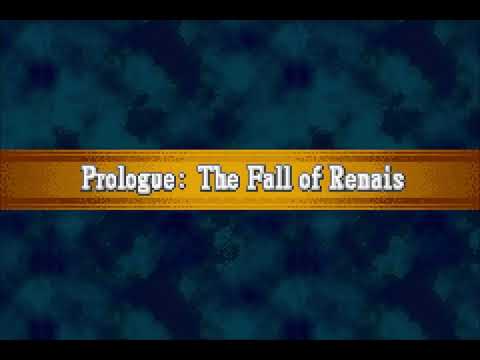
Also, you should be able to change the text itself if you have “Convert Chapter Titles to Text” installed. But you don’t need me to tell you that.
If you have any questions, feel free to comment below.
