Search
So you’ve checked out the decomp, and you’re getting settled to implement your slick new feature. The dreaded question comes to mind: Where do I start?
If this were a research project in university, I’d generally start by Googling some keywords, and the same principle applies here. Instead of using a general-purpose search engine, however, we’re going to search the repo itself for code containing specific words.
There are a few different tools for this – the search bar in Windows File Explorer or on Github will work, but I strongly recommend getting used to some kind of regular-expression based tool. The screenshots in this post will be showing ripgrep (rg), a command-line based modern replacement for the original grep, which comes with many Linux-for-Windows distributions, notably MinGW, WSL and git bash. For a GUI-based tool, you can check out grepWin, which is actively maintained and has good reviews, though I have never used it myself. I’m also told that VSCode can do regex search over an entire folder, if you already use that. If you’re not familiar with regular expressions, there is no shortage of resources on the internet. I recommend RegexOne myself.
The basic gameplan I recommend is to search for keywords until you find something that looks like it’s related to whatever it is you’re trying to do. Then, you’ll have to roll up your sleeves and actually read some of the code. If your question is answered, great! Otherwise, the code you just read will hopefully have given you something else to look for. In the most straightforward case (more often than you might think, and probably a good starting point if you’re completely lost), you might directly know the name of the next thing you’re looking for (for example, if you’re reading function A which calls function B, it might be a good idea to look at the definition of function B!). Other times, you might have to make do with a little less – maybe you learned some new terminology you hadn’t thought of, or you learned the name of a global variable that’s related to what you’re doing. Eventually, you’ll settle on the answer you’re looking for.
Of course, I recognize that the above paragraph is more than a little vague, and way easier said than done. Knowing what words to search for (and guessing which results might be useful) is more of an art than a science, and the closest things to hard rules require you to have some background knowledge about what things are called internally. Some basic tips that I’ve found useful, however:
-
It will take multiple tries. Be persistent; your first guess will usually be wrong. In these cases, try different capitalizations, synonyms for the same words, etc. The decomp mostly uses similar terminology to other tools, which can help narrow down the exact phrasing.
-
You’ll often search something so general that there are way too many results to be useful. I don’t know about you, but I do not have the patience to sift through every occurrence of the word “battle” (by my count, 973 just in files ending with .c). In these cases, I usually look at the first (or last) few results and see if any filename looks useful. If not, back to the drawing board.
-
The grep-based tools I recommended earlier are case-sensitive by default (meaning Stat and stat are counted differently). This can be annoying if you don’t know the exact capitalization, but it can help separate function names from parameters and locals.
-
Keyword searching is both good to learn the names of important parts of code and to find where specific functions (or structs, etc) are actually used.
If you don’t know the name of a specific function, it’s likely easier to search in header files only, and on the flip side, you should limit your search to source (.c) files if you’re looking for how a function is used. A function defined in foo.h is usually (but not always!) found in foo.c.
-
Try to search for things that you think will have fewer hits (but not zero!) rather than maximize coverage. It will help you narrow down to “useful-looking” code much faster, and it’ll be easier to filter out code that definitely isn’t relevant. If you’re not sure, when in doubt, searching for longer words will give you fewer results.
-
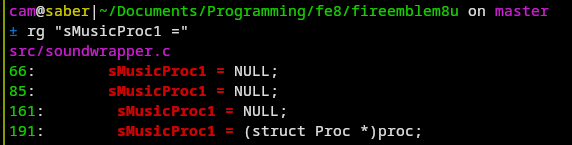
In many cases, seeing how/where a name is used is more important than its direct definition. For example, I don’t really need to know that sMusicProc1 is a Proc*, but knowing where this variable gets assigned to is probably very important. This is where using a regex tool comes in handy – I could search specifically for sMusicProc1 =, instead of just all occurrences of sMusicProc1.
(Image: finding all assignments to a specific variable)
-
Some functions have non-descriptive names, like sub_8084B98. My heuristic is to ignore these for as long as possible, only really digging in if it’s directly called by something relevant, or if it uses a global that I’m interested in.
Beyond keyword searches, the name of the game is small bites. While sometimes reading a lot of code is unavoidable, you’d be surprised how far you can get with intelligent guesses and only reading a few lines of context, which saves a lot of time in the long run.
When reading these two case studies, I strongly suggest that you follow along and think about what your next steps might be, and how you might be able to skip some of my research by cross-referencing FEBuilder or other communal documentation. I’ve built up all sorts of internal heuristics over the years that point me in certain directions (right or wrong), many of which are so ingrained that I can’t explain them to you. Your goal should be to build up your own sense of what to do next, which can only come from experience.
Case Study 1: Where to stat
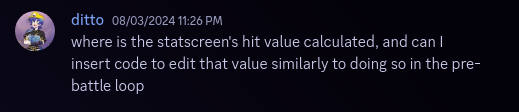
(Image text: “Where is the statscreen’s hit value calculated, and can I insert code to edit that value similarly to doing so in the pre-battle loop?”)
Our first exploration will be a “where does the number on my screen come from”-type question. In my experience, these tend to be pretty low-hanging fruit relative to how common they are, so it makes a great “getting your feet wet”-type example.
Here, we’re looking for the intersection of two systems (“calculating hit” and “displaying on the statscreen”), so that suggests two places to begin searching:
- Look for code that computes hit in general, then find where the statscreen calls it?
- Look for code that draws the statscreen, then figure out where it fetches hit from?
In keeping with “start with the more specific word”, statscreen is a pretty specific word, whereas hit could be used to mean something other than “accuracy”. Also, statscreen is 10 letters and hit is 3 letters. So we’re going to search for statscreen first.
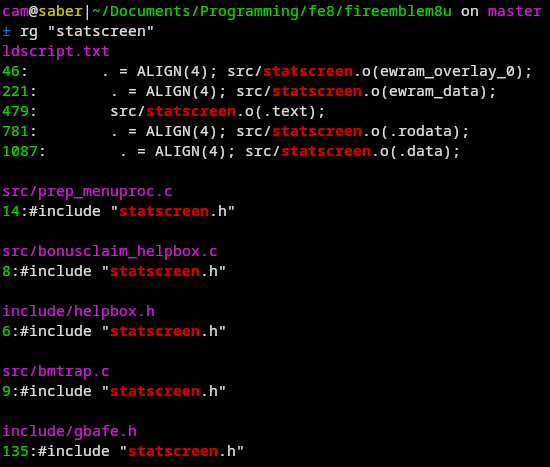
(Image: Searching for “statscreen”)
Not pictured: Like, 20 more #include "statscreen.h" results.
With all of these, it’s a pretty good bet that statscreen.c exists (alternatively, you could see the statscreen.o is in ldscript.txt, meaning that src/statscreen.c definitely exists). Taking a peek at that file in my editor, I see that it’s pretty complicated and there’s no chance that I’m going to understand the entire thing at once. Luckily, while the statscreen does a lot of things, most of them are probably not computing the unit’s hitrate (citation needed), so I can safely ignore anything that doesn’t seem to relate to hitrate.
Searching this file now for Hit, we get four different results (this is where case-sensitive search comes in handy – when I just press Ctrl-F for “hit” on the github webpage, there are over 20 results!):
-
The first result is gMid_Hit, on line 61: This is a good start, but it’s part of some big complicated struct that I don’t understand. It is next to something with the word LABEL in it, so maybe this is related to the literal text Hit on the statscreen. I still don’t know if this draws that entire section, or just the word Hit.
-
Searching further for gMid_Hit, the only other result is gMid_Hit and the word Hit on line 2875. This is some unknown magic number, but I’ll make an educated guess that Mid is actually Message ID, not just an evaluation of my code quality. And indeed, text ID 0x4F4 is the text Hit. This means that the entry in the large data structure above is probably just for the label.
-
If that data structure above draws the label, then the function that uses it is probably the same function that actually fetches the value. Searching for sPage1TextInfo (the name of the struct containing gMid_Hit earlier) takes us to the function DisplayPage1.
-
At this point, I don’t think I have much more of a choice but to skim the function. A few lines below, we have GetUnitEquippedWeaponSlot, which suggests that we’re on the right track. And indeed, just a bit below that, jackpot: on line 766, gBattleActor.battleHitRate.
The next step is to figure out what function actually populates the struct member gBattleActor.battleHitRate. This is bad, because gBattleActor isn’t referenced in statscreen.c beyond this one function, and gBattleActor sounds like a variable that is used in a lot of places that I don’t want to have to dig through (if you were following this conversation on discord, you’d have seen that I got stuck here). You could call it a day and simply fire up no$gba and set a breakpoint on gBattleActor.battleHitRate, but I find that unsatisfying.
Going back to the call to GetUnitEquippedWeaponSlot above, we notice that the first parameter is gStatScreen.unit. That’s interesting, I wonder where else gStatScreen.unit is used…
Searching for that term brings us to a call to BattleGenerateUiStats on line 409. Aha! This seems like exactly what we’re looking for! Going to the definition of that function (searching for BattleGenerateUiStats in header files takes us to bmbattle.h, so look in src/bmbattle.c), the only place battleHitRate is assigned is line 238, where it’s set to the constant 0xFF (= -1). That probably means that the value is populated earlier in the function, like in the suggestively-named ComputeBattleUnitStats a few lines earlier.
Finally, that function calls ComputeBattleUnitHitRate, which sure sounds like the end of our quest.
Reflection
Note that the precise process outlined here was actually quite roundabout:
- We could have skipped reading through
DisplayPage1 simply by giving up on gMid_Hit and continuing to search for the word Hit, which would have brought us to the use of battleHitRate.
- If I’d then thought to search for
battleHitRate =, we would have found ComputeBattleUnitHitRate right away.
I instead went through the painstaking process of running around through all these different functions because that was the actual path I took when searching for the answer to this question. You’re going to get it wrong, a lot. That’s not a good or a bad thing, just a reality of writing code.
Case Study 2: A smile would be nice
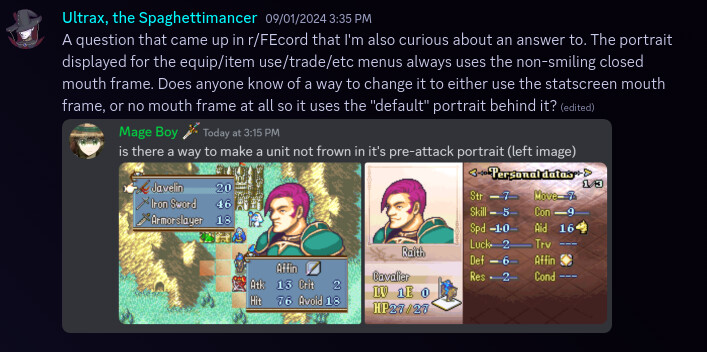
(Image text, paraphrased: “The portrait displayed for the equip/item/trade/etc menu always uses the non-smiling closed-mouth frame. Is there some way to change it to either use the statscreen mouth frame, or no mouth frame at all?”)
Here, we’re looking for something that is different between two different menus. Since we just got finished looking at statscreen.c, let’s open that and look for anything useful.

(Image: Searching for “Portrait” in statscreen.c, only two results)
Lucky! Not only are there only two results, they’re both in the same function!
Scrolling a little further down, we find the suggestively-named function PutFace80x72. I’m still not entirely sure what all these parameters are, but I’d guess that it puts a face of size 80x72 somewhere. Maybe this gets used somewhere related to trading?
As it turns out, this doesn’t go anywhere. I won’t waste your time by retracing the hour I spent following this line of inquiry, but suffice to say that I got as far as seeing PutFace80x72 in something related to stealing in bmmenu.c, then tried digging around that file to find where it drew the trade menu to no avail. It’s possible one of the functions there would have brought us to the right place, but there’s a lot there and I don’t have time for that.
Instead, let’s take a step back. We now know that Face is the term used internally in at least one place. PutFace doesn’t help either, and Face gives far too many hits to be useful.
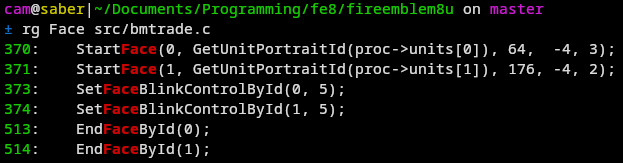
What about something more specific? Well, I spy bmtrade.h in the headers, and a corresponding bmtrade.c. Searching for Face in that file gives pleasantly few results:
(Image: Pleasantly few results)
The only one that seems useful is StartFace. Looking back, it would also be reasonable to guess that SetFaceBlinkControlById might be related, but at the time I assumed (correctly, as it turned out) that it only controlled, well, blinking.
So, what about StartFace? Reading that does a bunch of proc stuff, deals with some graphics, and I’d really like to avoid having to unwind that if I have to. The names of the parameters aren’t particularly helpful, either:
(Image: StartFace parameters don’t have useful names)
Instead, let’s take a wild stab in the dark and look for Smile.
If you run this search (image omitted, there’s a lot of results and you get the picture), you’ll find references to the text control code ToggleSmile. Searching for that (restricted to C files only) brings us to scene.c, which gives us the name faceSmileEnabled. From there, we can find this call to SetFaceDisplayBits, above which contains something about FACE_DISP_SMILE.
Now, we could keep digging, but I’m not sure that’ll be helpful – FACE_DISP_SMILE is a bitmask (you can tell because it’s used as an argument to something talking about Bits), and I’m sure it’s used in all sorts of places that are unhelpful to us.
There’s another way to make forward progress, but it involves making a few educated guesses and bringing together all the information we have. The linked line assigns to a variable called disp, which is incidentally the name of the last parameter in StartFaceAuto. The non-Auto StartFace has a parameter named displayType, but StartFaceAuto simply passes it through. So it’s likely that the last parameter to StartFace has something to do with smiling.
And indeed, if you change the 3 on this line to 3 | FACE_DISP_SMILE, you’ll find that one unit is now smiling.
It remains to find all the places that you might want to toggle smiling. I leave that as an exercise to you (searching for StartFace doesn’t give too many results, expecially if you realize that eventscr.c is probably not related to weapon selection).
Reflection
This time, I skimmed many of the details of filtering useful search results, partially to avoid repeating myself and partially because there often weren’t that many. On the flip side, however, many of the searches didn’t directly get us anywhere. We had to search for many different terms, change direction a few times, and only at the end were we able to bring it all together to get to an answer.
This search is also incomplete – it’s very possible that there’s a place drawing a face that doesn’t go through StartFace. Unfortunately, there’s no great way to know for sure that you’ve stamped out everything, beyond extensive testing.
Hopefully by now, you should have some idea of my thought process when doing decomp research. I’ve done my best to write down as many concrete tips as I can but I want to reiterate that these are a starting point for your own process (which can and should involve cross-referencing other kinds of documentation, which I’ve intentionally avoided doing for these examples).
In the next chapter, we’ll look into using the decomp in a more involved way, particularly using it as a reference to reverse-engineer others’ handwritten assembly.