Probably. People on r/EmulationOnAndroid have noted that shifting over to PulseAudio has led to more stable audio performance (less stuttering/latency).
I guess thats been my setting and it still crashes. Its odd, that seems to be the only one that refuses to play for me
When does it crash?
On load up. If i go into file manager and click on the exe then the screen will go black for like a minute and then bounce me back to the previous screen. If i use the container and click on the exe then i just stays on the desktop screen
It’s odd how FE7Lex is the only game you’re having issue with. They all pretty much run on the same engine. In any case, try VirGL, WineD3D, and the Compatibility preset in the Box64 Preset for your container. If that fails, then fiddle around your Direct settings in Win Components.
Past that, I may have a shot in the dark: something may have went wrong when you were extracting or copying over the files and LT is complaining that a critical file is missing. Go enable your debug and logging in Settings and check what winlator-logs.txt is saying.

This is what the log says. Im thinking maybe your right about it not extracting currently. Missing the library?
Perhaps. But I’m not getting anything from half of like four lines. Can you send the whole log? It should be in Documents by default.
I found the file but it 0b. Hitting the save button doesnt seem to do anything (i can be a bit computer illiterate, sorry). I did take another few screen shots to show what that whole line says.
Im about to travel back home but ill mess around with it more once im back.


Maybe we’re overthinking the problem and it’s just a matter of some files being corrupted. Maybe due to an antivirus? It only happens in FE7Lex for you. Are you putting the archive on your phone and extracting there or copy and pasting the files from another device?
dnsapi and libresolv crop up in OS land and are modules involved in connecting to the internet, so I don’t think they’re what’s causing the crash. LT doesn’t connect to the internet, right? For a more verbose log, press that + under Enable Wine Debug and tick everything that starts with dll, dx, d3d, d2d, and opengl. Maybe you’ll catch what happens before that termination log.
You can also try reinstalling system files. There’s a button at the bottom. Maybe it’s just Android being Android.
You can also try to find your LT crash logs. They’re probably in the usual place. Check the discord.
1 Like
Im downloading the archive and then extracting it. I have a few ideas i want to try out but ya, something is corrupted along the way i think.
Edit: progress report. I was looking thru my files and somehow every image was in my picture gallery. I got rid of it and re-download the wjole thing. After that i notice a compressed file in the data. I extracted it and deleted the compressed version and got this error

So i restored it and it ran!!! hurray they all say
BUT then the text got all bleedy

So now im working on that
1 Like
Why im so slow😭, im so confuse can anyone send video tutorial😂
Lmao how’d that happen? Glad you got it sorted.
Finally, something that I know stuff about. This is an issue with your graphics driver settings. Try cycling through Turnip, VirGL, and DXVK. One of those should work since you’re on an SG2. It’s a very well-documented chip in terms of Windows emulation on Android.
Next year, on FEE3 2025… Eretein finally sells out and records an early 2000s style tutorial on how to emulate LT on Android, complete with the bandicam banner. She turns in two videos instead of one to chase massive clout…
On a serious note, I’m sorry you’re having trouble. Just go through the instructions one step at a time. If you have questions about a specific part, I’ll be happy to help as much as I can.
6 Likes
Success!!!


After all the tinkering i was finally able to solve it somehow. The last are the settings that finally worked for me.
Thank you so much for your patience and help thruout this
7 Likes
Cool! Glad to see you got it working.
So on your device, CNC DDRaw works with FE7Lex, but not WineD3D? How is FPS? Curious because that wrapper’s for older classic games. Got me thinking that maybe I should run some benchmarks if your frames are decent.
1 Like
I havent run it yet outside of making sure the text looked legible but I’ll try a little later and let you know
1 Like
There is that new FE Awards show thing coming out around February, could maybe make a trailer for that lol
3 Likes
Update: ive only done the prologue but so far its smooth. Ill try to play more and let you know what the more intensive levels do
1 Like
LTPhone does somehow perform better during its more intensive scenes with CNC DDraw. It’s definitely a tweak that everyone should try out. Good work bringing this to light.
3 Likes
UPDATE
As my Christmas present to y’all, I finally discovered how to configure HorizonEmu for custom screen sizes. Discovered, because apparently it’s always been able to do borderless and immersive fullscreen mode like Winlator can. The option is just hidden behind sketchy UI decisions, whereas it’s immediately apparent in Winlator. Or it could just be me being dumb. Anyway.
Fullscreen on HorizonEmu:
- Go to
X11 Settingsand pressDisplay resolution mode -> custom. This enables another button that lets you input a custom resolution.
- Input the resolution of your game into the box. See the pinned directory. I believe you’ll have to do this every time you want to play a game with a custom resolution.
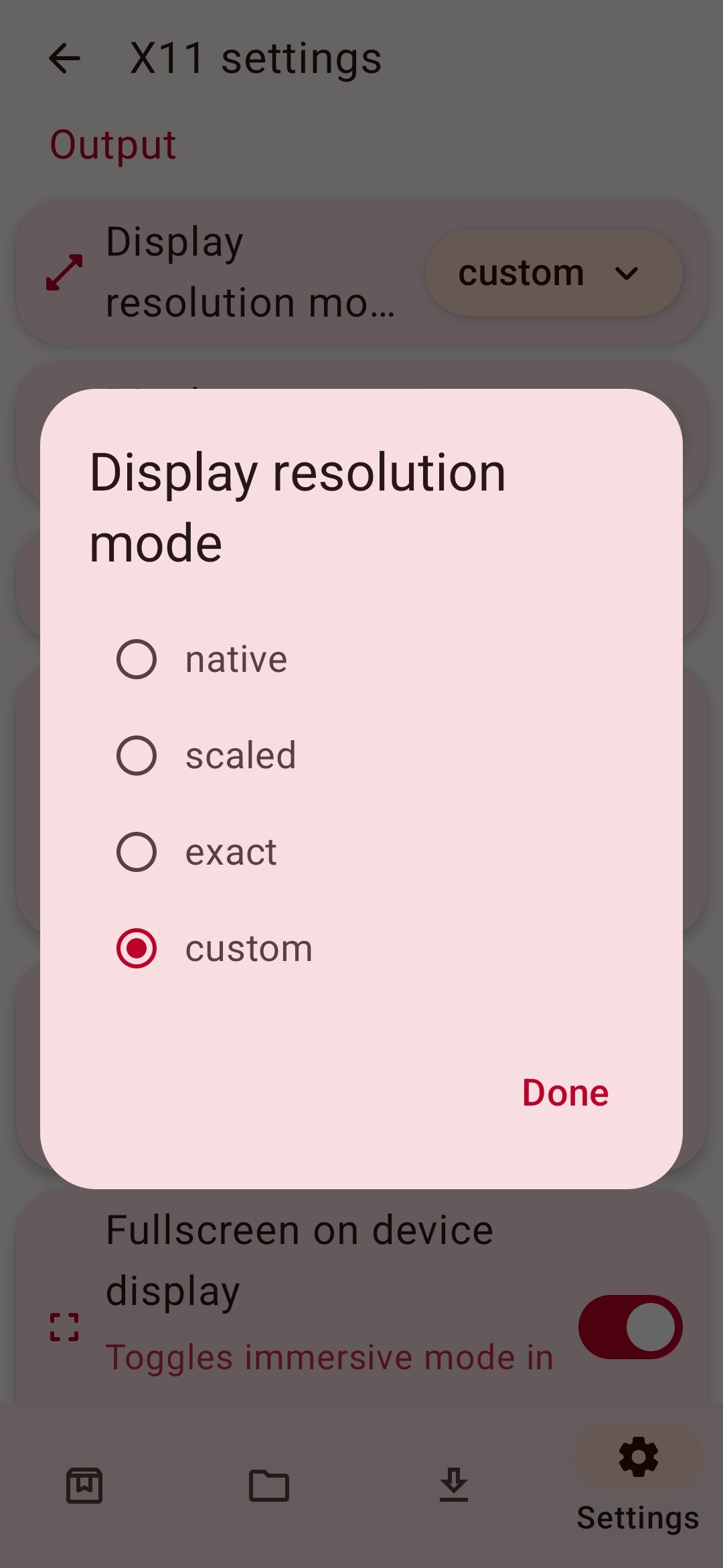
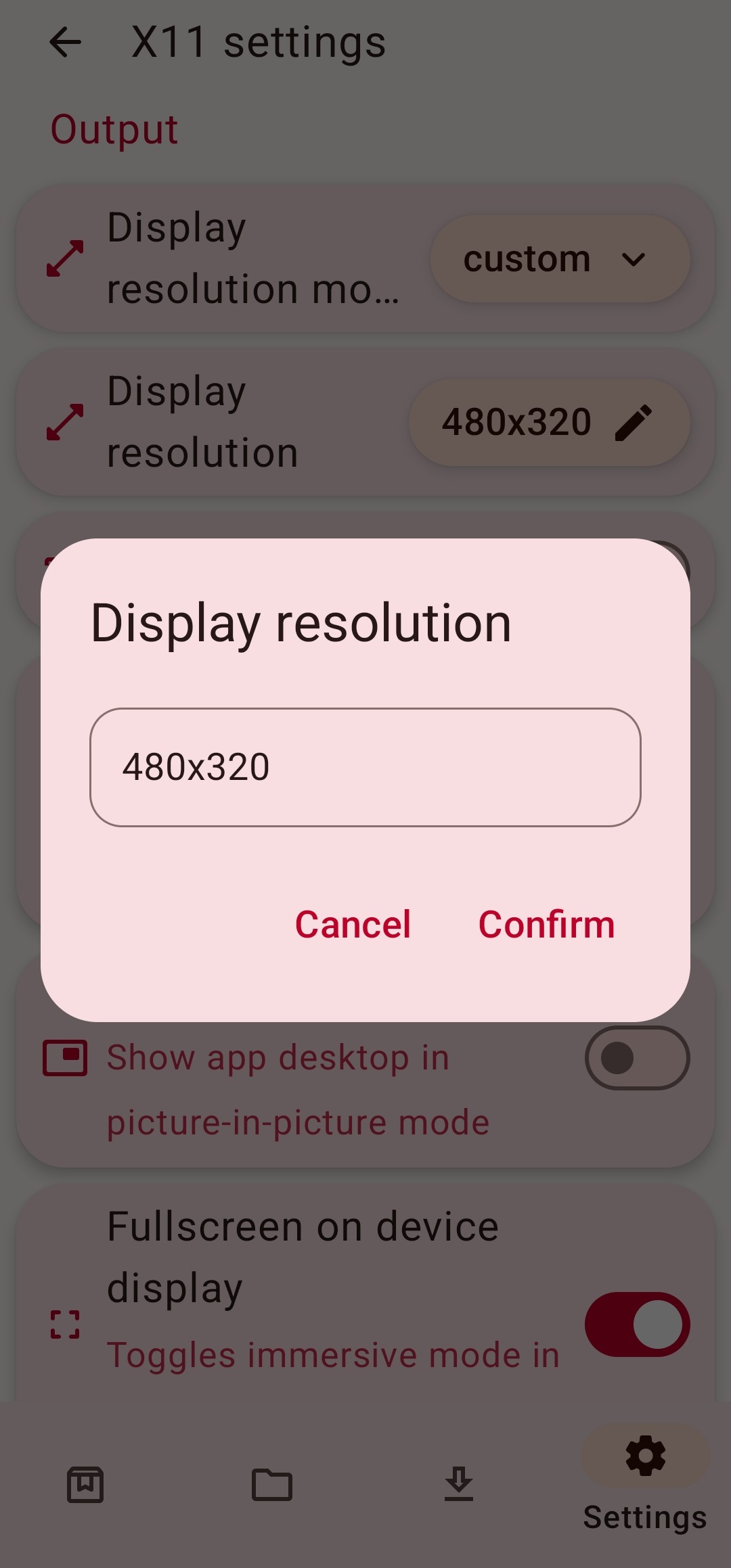
However, you still have to use InputBridge for controls, so that remains a point in Winlator’s favour.
New LTPad Preset
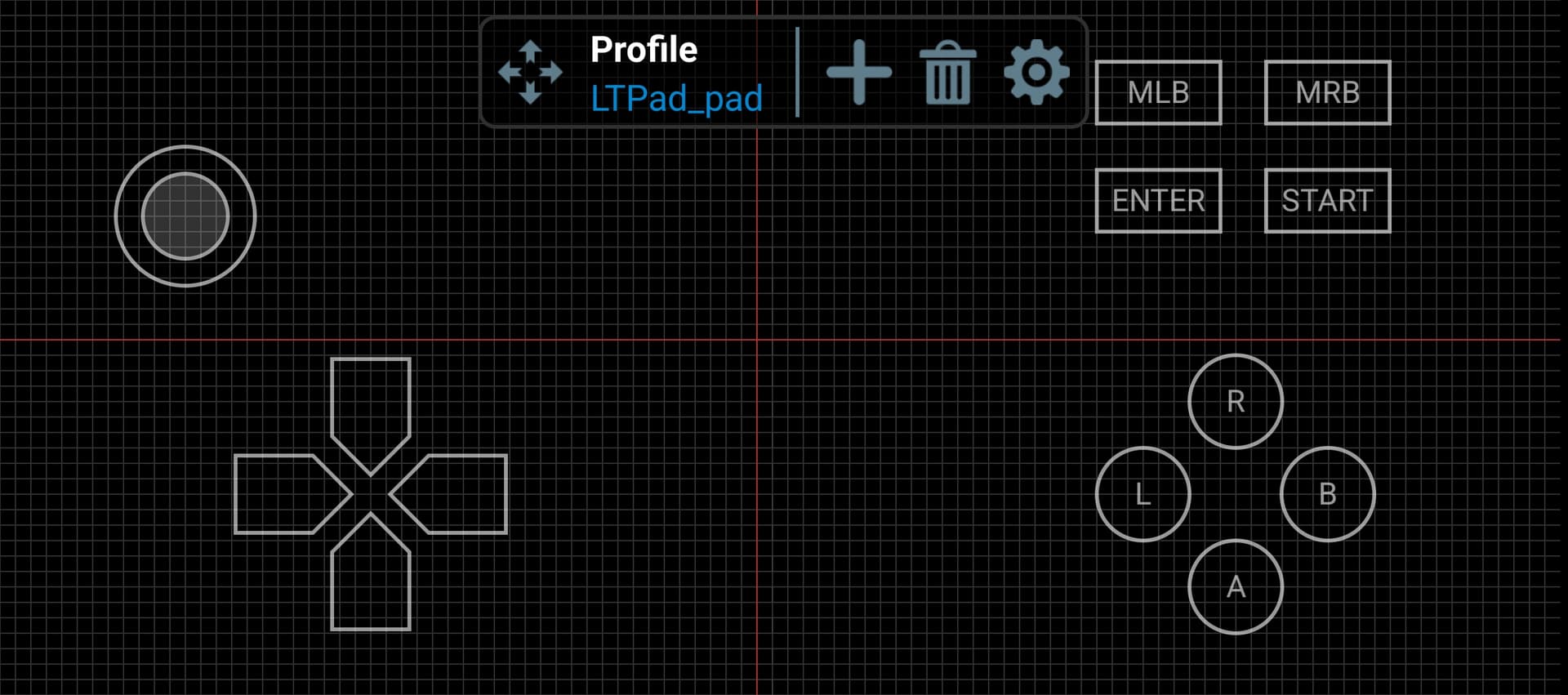
My second present to y’all is a new LTPad preset that ditches the (afaik useless) mousepad in favour of fitting both an analogue stick and a d-pad onto the screen. The LTPad download link has been updated.
7 Likes
Update Announcement
Winlator 9.0 has been released, featuring native vortek drivers that should theoretically improve performance on graphically intensive games (it’s a hit or miss lol).
However, 9.0 is an experimental build that (after testing) makes destructive changes to how the emulator handles graphics drivers. I suggest sticking to Winlator 8.0 since this version has been battle-tested on LT and won’t be prone to hotfixes in the next couple of weeks.
Those couple of weeks have passed and people have run the batteries on Winlator 9.0, so to speak. Updating should be safe and should net a tiny performance increase.
Getting down to brass tacks: Winlator 9.0 ships with Box64 v.0.3.2 out of the box. What we need to emulate LT is v0.3.0. Upon updating to 9.0, you’ll need to go to Settings -> Box64, then set the version to v0.3.0, and press the save button at the bottom-right. If v0.3.0 isn’t there, you have to install it by pressing the download button (just to the right). This is a setting you need to tweak if you’re seeing smeared lines on in-game text.
Performance gains using the Vortek drivers are on a per-device and on a per-game basis. Welcome to Android land lol. This means you’ll have to run the batteries yourself. But feel free to ask questions and share your data!
6 Likes