Prebattle Loop
Summary
In SkillSystem\EngineHacks\Necessary\CalcLoops\PreBattleCalcLoop we poin to each routine to run, and we place specific skills into SkillSystem_FE8\EngineHacks\SkillSystem\Skills\PreBattleSkills. These skills affect battle numbers in battle and in the preview:
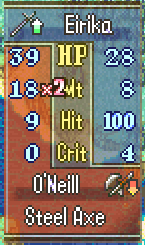
They’re also accounted for in the stat screen and by the Modular Minimug Box for things such as your Atk or Hit. They do not return a value in r0 - instead they load, edit, and store values related to the battle. Most of the relevant values here are HalfWords / SHORTs, so we use
ldsh and strh for them.
Let’s make a function that doubles your avoid, but takes away 5 battle defense (or Res: battle defense also includes terrain, support bonuses, skills, etc.)
void Elusive(struct BattleUnit* unit1, struct BattleUnit* unit2) {
    if (unit1->battleDefense < 5) { unit1->battleDefense = 0; }
    else { unit1->battleDefense = (unit1->battleDefense)-5; }
    unit1->battleAvoidRate = unit1->battleAvoidRate*2;
}
Note that in most cases of subtraction, we could run into an underflow issue. 0-5 = 0xFFFFFFFB, so let’s just make sure the minimum is 0 because it’s easier that way.
.thumb
.macro blh to, reg=r3
  ldr \reg, =\to
  mov lr, \reg
  .short 0xf800
.endm
.type Elusive, %function
.global Elusive
Elusive:
push {r4-r7, lr}
@ < my code >
.equ battleDefense, 0x5C
.equ battleAvoidRate, 0x62
mov r4, r0 @ unit1
mov r5, r1 @ unit2
mov r2, #battleDefense
ldsh r0, [r4, r2] @ load unit1's battle defense
mov r1, #5
cmp r0, r1 @ compare def with 5
blt SetToZero @ Branch if r0 is Less Than r1 to SetToZero
sub r0, r1 @ take away 5
b DoubleAvoid
SetToZero:
mov r0, #0

StoreDef:
mov r2, #battleDefense
strh r0, [r4, r2] @ store the defense back

mov r2, #battleAvoidRate
ldsh r0, [r4, r2] @ load the avoid
lsl r0, #1 @ Logical Shift Left 1 place. Or multiply by two.
strh r0, [r4, r2] @ store it back
@ < my code >

pop {r4-r7}
pop {r0} @ returns nothing, so good form to pop / bx to r0.
bx r0
.ltorg
The only new idea here is that we’re using strh instead of returning a value in r0.
| Load | Store | LoadSigned | |
|---|---|---|---|
| Byte | ldrb |
strb |
ldsb |
| Short | ldrh |
strh |
ldsh |
| Word | ldr |
str |
hey Vesly what the heck! there are like 15 different options here, what do I use?
Documentation is your friend. FE-Clib has stuff like this written down:
	/* 4A */ u16 weaponBefore; // ldrh
	/* 4C */ u32 weaponAttributes; // ldr
	/* 50 */ u8 weaponType; // ldrb
	/* 52 */ s8 canCounter; // ldsb
	/* 5C */ short battleDefense; // ldsh
u is unsigned while s is signed. The number indicates how many bits. Each byte is 8 bits. So u8 is ldrb, s8 is ldsb, u16 is ldrh, short is ldsh, and u32 is ldr.
If you find this too confusing, then try and stick to modifying existing skills and/or copying snippets of code for now.
Let’s test!
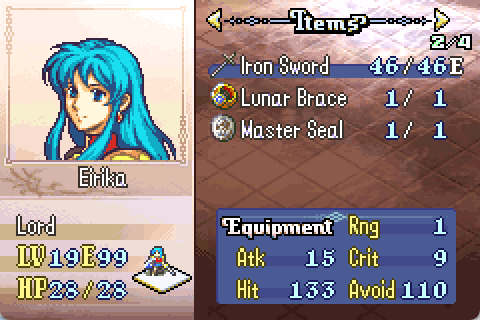
Okay, doubling avoid might be a bit overpowered.
Postbattle Loop
Summary
The Postbattle loop in SkillSystem\EngineHacks\Necessary\CalcLoops\PostBattleCalcLoop with specific skills in SkillSystem\EngineHacks\SkillSystem\Skills\PostBattleSkills is for effects after attacking.
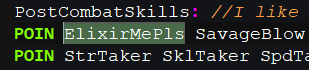
I feel like cheating some more, so let’s make player units get healed after attacking.
The post battle skills give you the current unit in r4, the defending unit in r5, and the action struct in r6. This is poor convention and makes the C code a little awkward. Good convention is to pass any parameters in r0, r1, r2, etc. and it’s what C code expects.
void ElixirMePls(void) {
    struct Unit* attackingUnit = GetUnit(gActiveUnit->index);
    struct Unit* defendingUnit = GetUnit(gBattleTarget->index);
    if (gActionData->unitActionType == UNIT_ACTION_COMBAT) { // if they attacked
        if (attackingUnit->curHP > 0) { // if they have any health left
            if (attackingUnit->index < 0x40) { // player only
                attackingUnit->curHP = attackingUnit->maxHP; // restore to full hp
            }
        }
    }
}
This has a few branches to end without doing anything unless the criteria is met.
.thumb
.macro blh to, reg=r3
  ldr \reg, =\to
  mov lr, \reg
  .short 0xf800
.endm
.type ElixirMePls, %function
.global ElixirMePls
ElixirMePls:
push {r4-r7, lr}
@ attacking unit already in r4
@ defending unit already in r5
@ action struct already in r6
@ < my code >
.equ maxHP, 0x12
.equ curHP, 0x13
.equ UNIT_ACTION_COMBAT, 0x2
.equ unitActionType, 0x11
.equ DeploymentByte, 0xB @ Found from the TeqDoq
@check if attacked this turn
ldrb r0, [r6, #unitActionType]	@action taken this turn
cmp	r0, #UNIT_ACTION_COMBAT @attack
bne	End @ if the action was not attacking, End
ldrb r0, [r4, #DeploymentByte]
mov r1, #0x40 @ start of NPCs
cmp r0, r1
bge End @ if the attacker is an NPC or Enemy, branch to the end
ldrb r0, [r4, #curHP]
cmp r0, #0
ble End @ If we have no hp left, End
ldrb r0, [r4, #maxHP] @ load max hp
strb r0, [r4, #curHP]  @ store current hp
End:
@ < my code >
pop {r4-r7}
pop {r0} @ returns nothing, so good form to pop / bx to r0.
bx r0
.ltorg
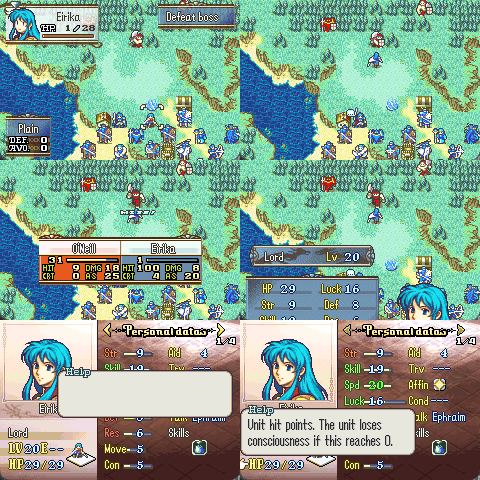
And it works! Nothing new - just now the effect is after acting. It is called the “PostBattle” loop, but Canto is here too. I’m not actually sure if we actually need the “PostAction” loop as well. 
Midbattle Loop
Summary
The “Proc” loop, located in SkillSystem\EngineHacks\Necessary\CalcLoops\BattleProcCalcLoop with specific skills in SkillSystem\EngineHacks\SkillSystem\Skills\ProcSkills has effects mid-battle.
Note: “PROC” here means “Programmed Random OCcurrence” - that is, a random chance of these effects activating. Be careful not to confuse proc skills with procs (processes), which is the system used to wait until specific code has finished (eg. wait for an animation to finish). I didn’t name these things 
Let’s make an epic boss that you can’t even damage!

We’ll write similar code to our stat getter function that made O’Neill have 99 Str.
.type Immune, %function
.global Immune
Immune:
push {r4-r7, lr}

@ < my code >
mov r4, r0 @attacker
mov r5, r1 @defender
mov r6, r2 @battle buffer
mov r7, r3 @battle data
.equ pCharacterData, 0x0
.equ unitID, 0x4
ldr r2, [r5, #pCharacterData] @ Get the address of the CharEditorEntry from the defender
ldrb r2, [r2, #unitID] @ Get the unit id from the CharEditorEntry
mov r3, #0x68 @ unit ID we're powering up
cmp r2, r3 @ compare
bne End @ Branch (skip) if Not Equal
mov r0, #0 @ damage to deal
strb r0, [r7, #4] @ battle data + 0x04 is where the current damage to deal is
End:
@ < my code >

pop {r4-r7}
pop {r0}
bx r0
.ltorg
It’s always calculating damage/hit/etc. for the current attacker (they take turns), so we check if the current defender is O’Neill, and if so, set the battle buffer + 0x04 (damage) to 0. And it works, of course.
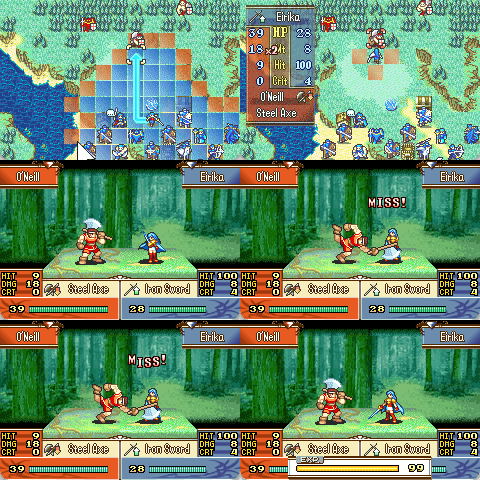
I’ll note, however, that these skills generally have more code than just the damage. So let’s gloss over these parts.
- If another skill activated or we missed, End.
ldr     r0,[r2]           @r0 = battle buffer                @ 0802B40A 6800
lsl     r0,r0,#0xD                @ 0802B40C 0340
lsr     r0,r0,#0xD        @Without damage data                @ 0802B40E 0B40
mov r1, #0xC0 @skill flag
lsl r1, #8 @0xC000
add r1, #2 @miss @@@@OR BRAVE??????
tst r0, r1
bne End
- We roll the die based on some stat as a percentage to activate.
ldrb r0, [r4, #0x16] @speed stat as activation rate
mov r1, r4 @skill user
blh d100Result
cmp r0, #1
bne End
- Set a flag so skills later in the loop can check this flag. If any other skill activated, then do nothing.
@if we proc, set the offensive skill flag
ldr     r2,[r6]
lsl     r1,r2,#0xD                @ 0802B42C 0351
lsr     r1,r1,#0xD                @ 0802B42E 0B49
mov     r0, #0x40
lsl     r0, #8           @0x4000, attacker skill activated
orr     r1, r0
ldr     r0,=#0xFFF80000                @ 0802B434 4804
and     r0,r2                @ 0802B436 4010
orr     r0,r1                @ 0802B438 4308
str     r0,[r6]                @ 0802B43A 6018

ldrb  r0, =Some_Skill_ID
strb  r0, [r6,#4]
You don’t have to make mid-battle skills a % chance to activate, but if you do, you may wish to change which stat is the % chance in #2 above. Additionally, at the end of #3 you need to store the skill ID used. Otherwise, you can simply copy paste these snippets of code into your own skill.