I’m looking to try working with the internal Game Boy chip instrument sets in FEBuilder to modify menu sounds and possibly incorporate them into music.
Editing menu sounds is more important and seems easier. I assume I can export vanilla jingles as midis, edit them in a DAW, and reimport with the same instrument set and values? Is there a recommended workflow from anyone who’s edited menu sounds?
As for using instrument sets 1-4 in music, I’d like to learn how to tweak the square waves, noise, and wave memory properties to get specific sounds. I could fiddle around with the values and import the song into the ROM, but I’m looking for more instant feedback. Wave tables are much more customizable, so how do you utilize the Waveform Data value? I’m aware that the menu sounds would blow out square channel notes, so I’d only use it for songs with no sound effects like a credits theme.
When handling audio in FEBuilder, there are two critical concepts you need to distinguish first: Music and Sound Effect. Their processing logic in FEBuilder works completely differently. The workflow you assumed — “export MIDI → edit in DAW → re-import” — is actually more suitable for music, while sound effects require a totally different approach. As for SoundEffect, I believe the import format supported by FEBuilder is WAV.
There’s some truth in here, but there’s also some inaccuracies. Every song AND every sound effect has corresponding sequence data that can be exported as MIDI and edited. Sound effects will generally have much shorter ones, however, and many will in fact use “DirectSound” samples (for example, weapon swing sounds). If you wanted to change the samples to a new one, you would import a WAV as mentioned.
However, the OP did not ask to replace samples, they asked how to edit the sound effects that use the Game Boy PSG hardware to play bleeps and bloops. No WAV importing will be necessary to perform this task, and a DAW will be sufficient to do the brunt of the work, however editing how the PSG “instruments” work is a different story, and it would be a headache to wrangle your DAW into accurately playing them as their properties are stored in the ROM, should you decide you want to change them, a headache I have not looked into in depth nor solved sadly.
As for editing these properties, I would recommend just using Sappy’s “Edit Voice table” menu over FEBuilder, it’ll be a bit faster and give you an actual interface to edit the wave channel waveform. There’s also a “Note off with Noise” toggle in Sappy I don’t see in FEBuilder, but I have never tried using it, so I have no idea if it works as advertised or not. For a very brief glossing over of what’s what:
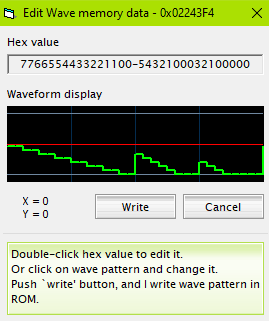
The PSG hardware gives you four “channels” to work with: Square1, Square2, Wave, and Noise. Each one has one note of polyphony per “channel” so you’ll have to work around that at all times. Square1 and 2 are mostly the same in terms of options but Square1 has parameters for “Sweep Time” and “Sweep Shift”, I think this does something with the frequency but never experimented with it tbh. You also get options for attack, decay, sustain, and release. I only usually see these go up to like 15 or 16 in vanilla usage but maybe they can go higher, you’d have to experiment. Wave’s “Waveform Data” field is a pointer to 16 bytes in ROM. Each byte essentially gets split “in half” to form the waveform. It might just be easier to show you with a picture:
It’s essentially impossible to make anything that sounds convincingly “real” with this low of a sample rate(?) but it can make some interesting enough sounds, might be good enough for a bassline in a song. I believe you can point to anywhere in ROM and it will read 16 bytes from there without complaint, but I haven’t tried.
Noise only has one unique toggle, “Noise Pattern” which is either 0 for 32,768 samples or 1 for 256 samples. I haven’t really messed with this but I think playing different notes in your sequence will give it a different timbre?
You can probably do most or all of this in FEBuilder if you insist, but a lot of playback and fine-tuning will likely be required. If it isn’t evident I’ve not tried to put a lot of this to practical use, so I don’t know the “most efficient” workflow. In my time lurking the scene most people do not put this kind of effort into the music side of things. I can’t recall seeing any hack with custom menu sounds whatsoever honestly. I’ll be keeping an eye out for whatever you can whip up with this knowledge though!
Thanks for all the info, you’ve definitely pointed me in the right direction!
You’re correct that I’m just looking to change PSG jingles and not importing any DirectSound elements. I will also keep the PSG’s polyphony limits in mind if I’m able to create music/jingles this way.
I successfully replaced the main menu/unit select effect, keeping the same parameters, but it kept looping. I’d exported the vanilla SE as a midi into FL Studio and kept the tail of silence intact, so it loops when reaching that endpoint. I did not pass the midi through Anvil. Usually FEBuilder composers struggle with getting their songs to loop, but now I need to figure out how to prevent jingles from looping.
I also tried out switching some DirectSound channels to PSG. Square Wave and Noise work as intended, with noise changing timbre with pitch as you suspected. I couldn’t get the Wavetable to work, though. I swapped one voice to Wave Memory but it’s silent. I’ll continue to tinker with it.