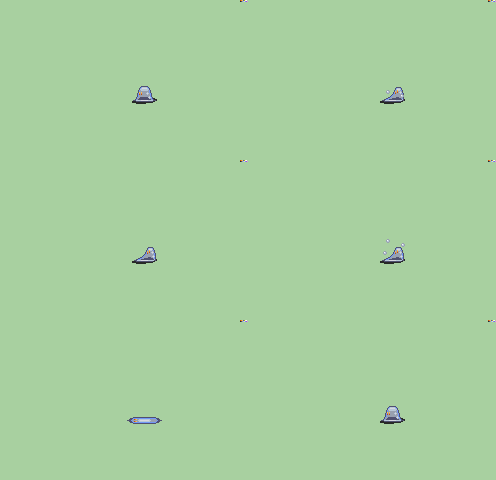
So, I’m trying to make it so that for the Tower of Valni and Lagdou Ruins, that treasure chests have a 90% chance of opening the intended treasure as per usual, and a 10% chance of spawning this little guy:
The Mimic: an amorphous blob that dissolves prey and uses magic. I intend it to be a rare drop because it’s easy to defeat, and doing so gives you the chance to get extra XP as well as rare item drops (dropping all kinds of valuable items from stat-boosters to rare weapons to gems, etc.). The problem is, as far as I know, FE6’s system of chest monsters aren’t present in FE8, and I wanna know if it’s possible to have that sort of 90% normal:10% little guy spawn rate occurring. Bonus points if you can make the chest disappear upon the 10% chance to spawn the little guy instead, showing that the chest is the monster.
Make it so the chest contents are all set to 0% probability, then use the completion flag to trigger an always event which does what you want. There is a command to generate a random number in events, and you’d use that to branch between all possibilities including spawning a unit.
You’ll still see a "you got a " warning, but to change that you’d have to look deeper into the code.
EDIT: Actually, it looks like you can run events by setting the Type to 0x12, so that’s not even the case.
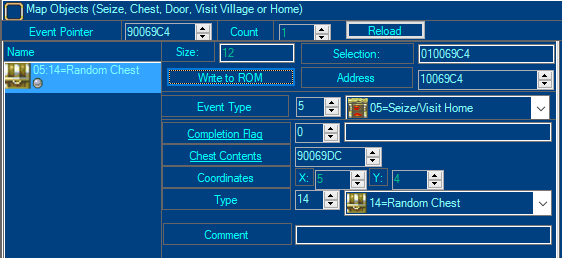
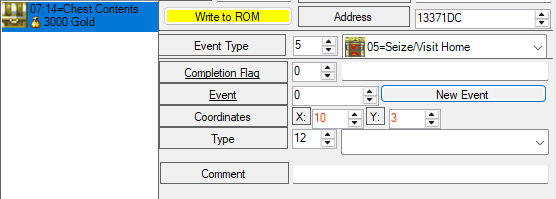
The event type is Seize/Visit Home (0x5) and the Type is 0x12 which is unlabelled in FEbuilder for FE8.
Then the “chest contents” will be an event instead, set it to 0 and make a new event to do whatever you want it to do. Generate an RN, then based on it either give an item and trigger the tile change with the chest open or spawn a unit and trigger the tile change without a chest.
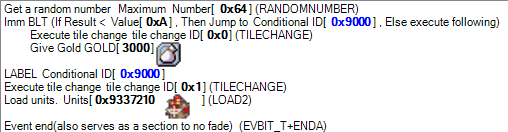
-Generate a random number up to 100
-If random number <= 10, jump to mimic spawn
-Give item and trigger the chest opened tile change
-Jump to event end
-Mimic spawn: Load unit group, trigger the tile change where there is no chest anymore
-Event end
If you’re new to events, my two recommendations are referencing existing events from the vanilla games or romhacks with FEBuilder and checking the event templates available in FEBuilder, then with some trial and error you’ll learn. If you have specific questions then it’ll be easier to help.
Seems right, assuming the tile changes are set correctly and the unit in the unit group is the one you want to appear. And you might need to do the sound effect in the event, I don’t recall if it happens automatically with this event type.
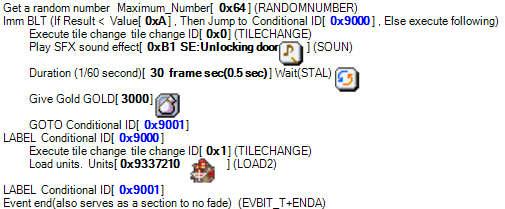
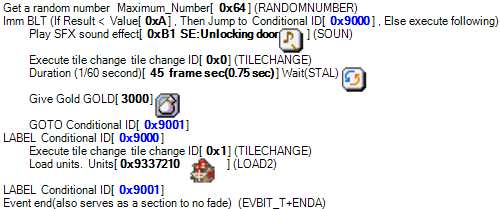
Gotcha. Last question, what is the sound effect hex for Chest Unlock? And isn’t there a pause for like, 30 frames or something? Thank you, you’ve helped a lot.
Second jump? It says “else execute following,” doesn’t it? It has a 10% to jump to conditional ID (aka loading the Mimic), versus the 90% chance to simply spawn gold.
Yes but after it gives gold it will continue to the statements below it, and so also spawn the mimic 100% of the time. That’s why you need a second jump in between to skip the mimic if gold is given.
Yeah, I missed that they don’t have a GOTO. If you scroll back to when I listed the commands, it’s the “jump to event end” that you forgot. Currently what you’re doing is 90% chance of chest and mimic, and 10% chance of just mimic. Add another label just before the event end and a GOTO to it after giving gold.
If you’re used to programming’s if-else statements, branches are kind of the opposite of how those work. Instead of “If X > 10 then do this” it’s more like “If X <= 10 then skip this”, so you need to use GOTO to skip mutually exclusive sections of the event.
I don’t remember what the chest SFX off the top of my head but you can just search for “chest” in the song table/title editor, or whatever it was called. You can use the STAL command to do nothing for a given amount of time.
If you want to test duration, with control+P on VBA-M, you can pause the emulation, then pres control+N to advance one frame, to test how many frames it takes for the tile change to occur. FE8 runs at 60fps.