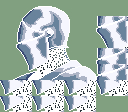
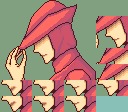
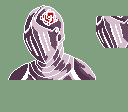
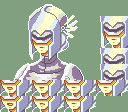
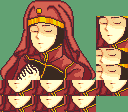
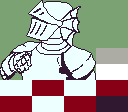
So im really new to this fire emblem gba artstyle especially pixel art which i have no to little experience of. i joined here because an old friend whos a big fan of fire emblem my decided and we were like
“hey i think you might like this community since your able to make custom made gba fire emblem portraits.”
“alr ill make some art.”
i have an ok art experience for now and will mainly post here for long term stuff.
I’ll mostly me making generic portraits and i would like some tips(any tips) which softwares you guys use? i heard GIMP, mspaint, asperite and usenti(currently using)
anyways heres what i did so far. where else can i post these besides this thread and discord? any suggestions??? I plan on making them f2u and f2e. feedback and credit is appreciated so i can make more of these!!!
Welcome! I use paint.net for my splices, have this whole standardized procedure for making frames, though I also use LibreSprite for some auxiliary purposes(minimugs, palette checks).
The “can’t post images” thing is a permissions issue- just interact a little more, post in other threads, you’ll get it soon enough.
Hi there. I used to do pixel art in Usenti, but nowadays, ever since one year ago, I mainly use a mobile app called Pixel Studio, where I do all of my pixel art related stuff. I haven’t tried it just yet, but from what I saw it has the capability to support Asesprite, so you can allow it to use Asesprite on a phone.
I haven’t been on any DC servers nowadays, but if I’m allowed, I would check to see other people’s art and prevent me from missing something. But once you interact more in this forum, you’ll be able to post your artwork here.
Hi there! Not much of a portrait artist myself, but I was messing around with portraits before my project’s team got additional help to make them.
usenti isn’t a very good tool when it comes to color accuracy. You might have some trouble when transferring completed images to a hack because certain specific colors are needed for the backgrounds to register as backgrounds. So whenever I thought I was using the correct green for the background, it turns out that usenti was sort of color correcting it to something else. So keep that in mind when uploading images for use.
Personally, I use Clip Studio Paint for color correction using Select Color Gamut to pick the color you want to change, then eye dropper on whatever color you want it change it to, then convert to drawing color. CSP isn’t a free software though, but I personally use it a lot so it’s worth the lifetime purchase for me.
I’m a bit new to doing sprite work (mainly just been splicing so far to get a hang of things), but I will second PaintDotNet. It allows you to use layers, which has been really helpful for making sure different parts overlay currently and the shadows look right. Shift+Magic Wand at 0% hardness is really helpful for highlighting all pixels of the exact same color for making corrections.
Though, because it’s just a standard photo editor, I do still use usenti to make sure I don’t go over the color limit, and if I do it’s really easy to locate the pixels that need correcting. It’s a somewhat clunky workflow, but it’s worked decently well so far.
pixel studio? do you guys use like pens or with your finger on mobile? i am currently using a mouse to make them but i have a digital pen but what do you guys use?
i see so the benefits is layers if your doing sketches or doing different parts. is it easy app to use? im honestly trying to get a hang of the fe universe website and usenti itself
I’ve been using it a long time, so I don’t remember how much of a learning curve there was, but I would definitely say it’s pretty easy to use. There’s a lot of functions in menus but the main stuff like layers, color picker, and tools are always visible, so it makes switching between stuff pretty quick, and everything is labeled. It’s free, so you can definitely give it a try and see if you like it.
The only thing I’d add is that the .NET part is a Windows-specific code library, so if you’re on Mac or Linux you might not be able to use it without some heavy workarounds.
Slightly late response, but I do pixel art on mobile with my fingers. Don’t know how effective that is, but so far I’ve been fine doing it like this, and it’s easier than using a mouse on a PC for art.