Not currently, I just do whatever stuff that I’m personally interested in (and that’s mostly based on motivation)
2 Likes
If you’ve been using some of my other standalone hacks, please note that HelpText is different in a few ways.
- The easiest way to use this is in a buildfile where MSS (Modular Stat Screen) is also used. You can attempt to use this without that specific requirement, but making the necessary edits will be more tedious.
- To install this, you need to include Installer.event, not HelpText.event. This was done to avoid confusion between having both HelpText.event (the main file) and HelpTextText.event (the file that overwrites text ids for usage).
- The description is very long compared to the usual description I have, so it has been given its own file (README.txt).
- The installation process is done through multiple installers that are included by the main file. These installers can be toggled on/off through certain definitions existing/being commented.
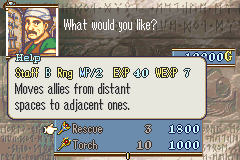
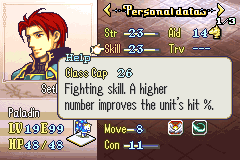
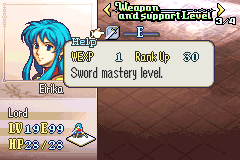
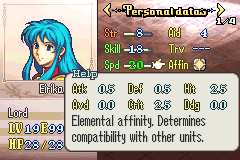
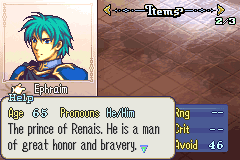
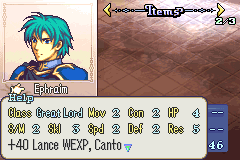
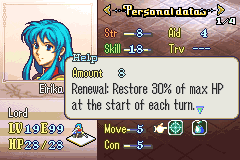
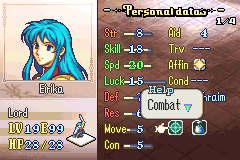
Description (from README)
Credit to Vesly for his ExtendWeaponDescBox assembly and for getting the Flashing Arrow to appear for MultipleHelpTextPages (HelpBoxOnOpenHook and FlashIcon).
Important take-aways
- Most of these modules require an edit to MSS. Look at the file included in Reference to see what kind of changes you need. To quickly find out changes, search for the definition (e.g. USE_HELP_TEXT_CALC) in RText.event.
- Engine hacks/patches that edit the information inside of helptext/Rtext may conflict with this. I have created compatibility modules for the ones that I’m aware of. Please report any such conflicts to me so that I can (attempt to) fix these issues.
- If you’ve already installed Vesly’s ExtendWeaponDescBox, you can either comment out the installation you already have or comment out its inclusion in this file on line 34 of Installer.event (the main file).
- To exclude/include modules, comment/uncomment definitions made on lines 10 and below of Installer.event
- If you’d like to change the range of text ids that are overwritten, edit the definition on line 6 of HelpTextText.event. If you don’t want the text ids to be overwritten at all, comment out line 7 of Installer.event. Keep in mind that nearly every module needs certain text to properly function.
Help Text
There is a vanilla mechanic where the player can press “R” on certain elements during gameplay. When the player looks at a weapon, for instance, not only does a description for that weapon show up, but the game will also display other characteristics (I usually refer to these as “labels”) and values within those characteristics (e.g. 8 might, 5 crit, etc.)
This assembly edits that mechanic so that other types of helptext can be more easily created. When new those types are being viewed, suitable labels and values can also be displayed. Due to both the size of this assembly and its contents mostly being optional inclusions, the installation process is done over several files instead of all of it being contained within this file.
For ease of use, MSS (Modular Stat Screen) is highly recommended. You could attempt to use this without MSS, but making the necessary edits will be way more tedious.
Subfolders
_HelpTextEssentials: This handles the base game types of helptext (weapons/tomes, staves, and save file), the new process for determining what type of helptext is being viewed, and edited routines for when the game needs to see if there are labels, values, and additional space needed.
ExtendWeaponDescBox: This assembly by Vesly allows the helptext box to display up to 5 lines of text. Some of the optional modules require this functionality, so it’s been included. If you are already using this assembly, feel free to either comment out its inclusion (either the one in this file or wherever else you have it in your buildfile).
Modules: All of the optional assembly has its own subfolder within this subfolder. Further installation is handled in each used subfolder.
Reference: Unless you are only installing HelpText to have multiple pages for items, you will need to edit MSS for the optional modules to work (in particular, RText.event). This file isn’t actually being installed; it only exists as an example to the modifications needed for your own MSS setup. To quickly find changes, search for the definition (e.g. USE_HELP_TEXT_CALC) in RText.event.
StatScreen_HelpBoxIdle: In vanilla, there is a routine that checks if the cursor can move to wherever the player is trying to go on the stat screen. The edited version of this routine has its own folder and installation, allowing it to account for the multiple potential user setups.
Optional Modifications
Note: Most of these require some sort of edit to RText.event (see Reference).
Help Text Text: This file directly edits text ids for the other modules to use. Keeping this uncommented/unedited is ideal for previewing modules that you’re interested in. However, once you’ve decided on what to actually use, you may want to either comment out the definition or edit the text ids this file uses to avoid conflicts.
Multiple Help Text Pages: This module allows the player to press “A” to access another page of helptext. This includes items by default, but there’s also functionality added for character/class descriptions to go to promotion details and additional pages for skills.
More Staff Info: This module adds more information to be displayed when a staff is being viewed. By default, EXP and WEXP are shown.
Weapon Ranks: This module adds viewable WEXP and the WEXP needed to reach the next rank for a given weapon rank.
Calc: This module adds a blurb of text describing how a battle stat is calculated. This is specifically for battle stats shown on Page 2 of the Stat Screen.
Char and Promo: This module has two components. Firstly, it adds an age and pronoun blurb as the first line of a character description. Secondly, if the player presses “A” on a unit that can still promote, this will also show promotion benefits. If none of the link settings below are defined, then promotion information cannot be accessed.
- Link Char Desc with Promo: The player can access promotion benefits by pressing “A” on the unit’s character description.
- Keep Vanilla Char and Link with Promo: This is identical to the above setting, but completely disables the age and pronoun display. Both settings cannot be defined/used at the same time.
- Link Class Desc with Promo: The player can access promotion benefits by pressing “A” on the unit’s class description.
- Promo Bases Difference Display: The displayed values are the difference between the two classes’ base stats instead of being the class’s promotion gain data.
Skill: This module adds information about the specific skill being viewed. By default, information to display includes an active/inactive indicator and an amount calculator.
Cap: This module displays the max value that a stat can reach in the unit’s current class.
- Caps with mods: Instead of only showing the class cap, it will also show a modifier and the sum of the cap and modifier, with the sum showing up on the left. Note that this is display only; the functionality for characters influencing their class caps is not actually installed.
Affinity: This module shows the benefits that the character’s affinity has in supports.
Overwrite Help Text Box Position: This module adjusts the calculation for determining where to draw helptext box in a few different ways. Firstly, to make its position more consistent, the box will always display above the cursor as long as its no higher than a set y-coordinate. Secondly, boxes with 4 or 5 lines won’t overlap the top edge with the top of the screen. Lastly, if USE_HELP_TEXT_CHAR_AND_PROMO is defined, the box will align up with the bottom of the screen for character descriptions.
Weapon Rank Move Right Check: This adds a routine to StatScreen_HelpBoxIdle. Some MSS setups display only the ranks that the unit has in two columns. However, if the player attempts to go to the right column when a unit only has one weapon rank, the helptext box and its content will be redrawn, even though it seems like the cursor didn’t move at all. This will instead reject the player attempting to move at all, so the box and its content will continue displaying.
FAQ
(Disclaimer: these are not actually frequently asked questions)
Q: What engine hacks/patches are incompatible?
A: Engine hacks/patches that edit the information inside of helptext/rtext may conflict with this. I have created compatibility modules for the ones that I’m aware of. Please report any such conflicts to me so that I can (attempt to) fix these issues.
Q: I already have Vesly’s ExtendWeaponDescBox installed. What should I do?
A: Either comment out the line that includes it in this file or the previous installer in your buildfile.
Q: I’m using a compatibility module, but I’m getting an error even though I’m using the engine hack/patch the module is made for.
A: If this assembly is being used in a non-buildfile environment, you need find where certain functions from the engine hack/patch were installed and then define them in this file.
For SupportReworkRework, you need to define DrawRTextStatLabels and DrawRTextStatValues.
For ChangeUnitDesc, you need to define ChangeUnitDesc.
Q: I’m getting an error at build time.
A: (If these sort of bug reports show up, I will update this section to be more helpful. For now, this is the only error that I can predict ahead of time.)
WeaponDescLooper is from MSS.
Q: I’m looking for a specific function/list so I can edit it, but it’s not in the folder I’m expecting.
A: It may be in the MultipleHelpTextPages folder. Anything related to linking certain pages together should be inside of that module’s folder. How the information on a page is displayed is handled by other modules.
Q: In the HelpTextIdTable and HelpTextTypeList, some entries have a routine for labels and values, while others have a routine for “info”. What’s the difference?
A: When I first started looking into making new types of helptext, I was under the assumption that the two had to be separate. I found out that that’s incorrect by experimenting with a newer module. Going back to change older modules to follow suit isn’t something I’m very interested in doing, as at the end of the day, they still function. If you decide to make your own modules, choose whichever method you’d like.
15 Likes
Just put out an update for HelpText. Shoutout to Retina for helping me with some bug reports.
- Added support for 8 rank display
- Updated comments in Installer.event that were referring to the old method of behind the scenes stuff
- Fixed SupportReworkRework module not identifying supports correctly
- Fixed holding down the R-button during StatScreen HelpText almost immediately closing HelpText
Changed/New files
Changed Files:
Installer.event
README.txt
_HelpTextEssentials/IdentifyType/HelpTextCheckForDrawingValues.asm
_HelpTextEssentials/IdentifyType/HelpTextCheckForDrawingValues.lyn.event
Modules/WeaponRanks/WeaponRanks.event
Modules/SupportReworkRework/SupportReworkRework.asm
Modules/SupportReworkRework/SupportReworkRework.lyn.event
StatScreen_HelpBoxIdle/asm/StatScreen_HelpBoxIdle.asm
StatScreen_HelpBoxIdle/asm/StatScreen_HelpBoxIdle.lyn.event
Reference/ModularStatScreen/RText.event
New files:
Modules/WeaponRanks/asm/NewRankGetter_8RankDisplay.asm
Modules/WeaponRanks/asm/NewRankGetter_8RankDisplay.lyn.event
Modules/WeaponRanks/asm/RankHelpTextValues_8RankDisplay.asm
Modules/WeaponRanks/asm/RankHelpTextValues_8RankDisplay.lyn.event
Reference/ModularStatScreen/RText_8RankDisplay.event
2 Likes
Just put out an update for Shopping Edits. Due to how the price modification functionality and SkillSystem’s Bargain skill are hooked, that skill will stop working unless the user made a new skill check and added it to PriceDiscountFunctions. This update is just me doing that.
4 Likes
Happy International Hack Release Day!
Description
This is something that I originally planned for the Super Hit Post Contest, but I ended up not actually finishing/submitting an entry. However, I still wanted to release this silly gimmick (with a few new tweaks) since I implemented it before abandoning development.
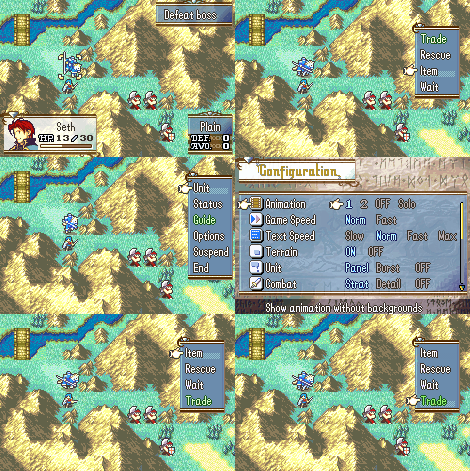
Here’s what Whimsical Unit Menu does:
- The order of usable unit menu commands is randomized when the game starts checking unit menu command usability.
- During this menu, cursor control (up/down) is disabled. The cursor will move to the next command after a certain amount of frames. This amount is determined by the current difficulty and the ingame game speed option.
- If “A” is pressed, there is a small chance of instead triggering the effect on “B”. This chance is influenced by difficulty, but is always 0 if Wait is selected or if the unit has successfully carried out Take, Give, Trade, and/or Supply.
Example gif
15 Likes
Absolutely diabolical ASM. Hats of to you, sir
Unit Menu Update Warning Cache
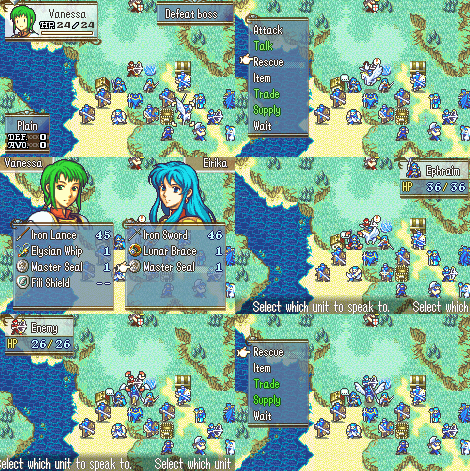
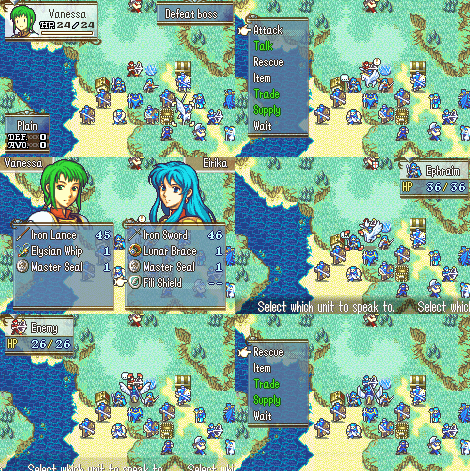
Whenever the unit menu is started, the game will now update the warning cache made by HpBars. For example, talking with an ally will now remove the talk bubble over that ally (unless it is a repeatable event).
The two gifs below have the following scenario:
Vanessa cancels out her bow weakness by taking Eirika’s Fili Shield. Vanessa’s talk with Ephraim unlocks a talk that allows her to recruit an enemy sniper.
Example gif (Before install)
Example gif (After install)
Compatibility clarification: This doesn’t touch/modify any of the actual code from HpBars; you do not need to adjust how HpBars is installed or uninstall it. The only issue you would have with this is if you have anything modifying 0x4F64C (StartMenu_AndDoSomethingCommands)
9 Likes
The unit menu bug with the assembly above should now be fixed. Please redownload if you intend on using this!
Shoutout to UltraxBlade for notifying me of this issue in the first place
2 Likes
Pushed out a small update for HelpText that removes RTextLoopLink from HelpTextEssentials because it’s not referenced by any other file.
Example gif
Description
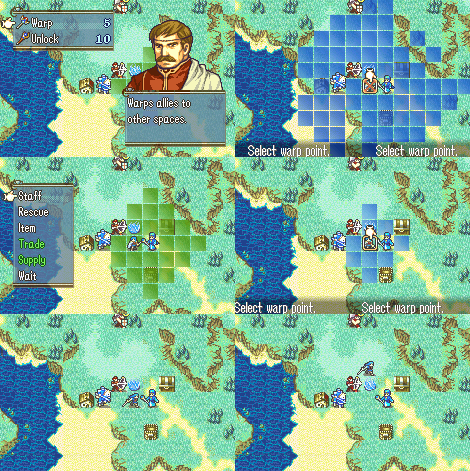
This allows each item that uses the Warp staff targeting routine to have different warp ranges. If an item id has multiple entries, the first one read from the list will be used. Note that having an item on this list doesn’t grant it warp functionality by itself; the item still needs warp usability/targeting/effect to be set.
18 Likes