Yes, Bow Knight handles spears and bows.
This hack seeks more feedback.
Let me know if you are interested!
Fatigue Mode will be released at a later date.
1 Like
I will play this on the weekend. Work keeps me busy.
1 Like
It’s nice to see the update
1 Like
3 chapters in, I’m enjoying my time with this hack, but I’m a bit bothered by the quality of the translation so far. Contractions and other character mannerisms are used inconsistently (often across a single line), some lines are phrased unnaturally, and a few feel like they’re one word too long or too short.
1 Like
I’m sure they’d appreciate some help smoothing over the translation. Or at least more specific examples of lines that need attention.
Nice!
Though I can’t help but think it would be a good idea to display the name of the combat art somewhere while you’re selecting the weapon. It’s kind of hard to tell what’s going on, as is.
Is this something that’s planned, or…?
4 Likes
I’m pretty sure you get R text while selecting.
1 Like

Ooh, I didn’t see the icons down in the bottom left (the gif moves pretty fast).
That’s super neat.
1 Like
Perhaps drawing a UI box behind them like the other two on the screen would draw attention to that area and also give them a backdrop to better stand out against?
3 Likes

Thanks for the suggestion! Hopefully it’s more obvious now.
13 Likes
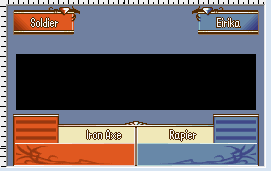
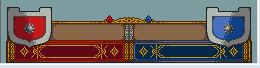
Hello everyone!
I have a new battle frame design!
Looking for someone to help with this!
Please feel free to call.
Thank you.

16 Likes
Unfortunately, even with the quarantine we’ve got going on where I’m at, I don’t think I’d have the time (or drive/motivation) to actually convert it into a frame (and, even then, I tend to cram in too much detail to my frames anyway which makes fitting it into the max number of tiles very difficult), but looking at it, here’s what would likely need to happen:
- It’ll need resized to 1/3rd of the dimensions. I believe the actual template is also 256x160 as there’s 8px added to each side for when the frame shakes/moves for damage as well as when it’s only a centered half-frame for Fortify and Class Change. You can see that there are areas where the frame extends beyond the normal viewable edges for this effect to occur.
- If you can remove the blur/AA that goes along the top edge of the bottom half of the frame, it would definitely help so that the background is all a solid color and it doesn’t muck with making a color ramp for the shades and features along that edge.
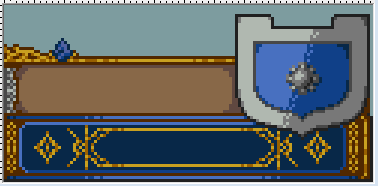
- Because of the half-frame versions, your centerpiece along the bottom is going to be displayed as cut in half at times, so you may want to rethink the design slightly so that there could at least be a darker pixel color that runs down that edge when converted to the smaller resolution for use in the game. As you will probably have factions other than red or blue, you may want to consider changing the colors inside the diamond right below the centerpiece as well, but again, it will be split in half when that half-frame is used. (For example, on my template, I used the shading that I did so that it has a more natural edge to it when split apart.)
(UPDATE - I actually went and checked this and apparently on Class Change it just removes the scalloped design in the center in vanilla FE8. Might be a hard-coded thing though, because I was pretty certain that I remembered seeing custom battle frames having the designs cut in half…)
-
I believe you get 15 colors + the transparent BG per half of the template (but I almost never max it out anyway so I’m not 100% sure on that). You’re probably looking at 4-5 shades for the red/blue/green/grey faction colors (1 light for the snowflake in the name box, 2-3 mids in a ramp for the color and detailing in the name and Hit/Dmg/Crt boxes and detailing on the snowflake, 1 dark shade for the flat lines in the Hit/Dmg/Crt boxes), 4 shades for the filigree atop the bottom half of the frame (white or pale yellow highlight, mid yellow, an orange-y shade for shadows, and a brown-ish grey/tan for the interior edges and linework), an outline color similar to vanilla FE8’s, and then 5-6 shades (depending on how many used for the faction colors or if you can reuse some of the shades from the filigree) for the tan parchment-y areas as well as the less bright gold shades used around the name boxes and at the top and bottom of the Hit/Dmg/Crt area.
-
You can probably just cut the image in half vertically (as a test, I reduced the size of the image to 240x160 and then just cropped the image) and take the blue half into Usenti and requantize to 16 colors to get a rough baseline for some shades and then I’d adjust and expand what it gives you to make the palette for one faction. It looks like Usenti is going to more heavily favor the intricate parchment effect in terms of giving unique colors at the expense of the gold filigree from a quick test I did, so you’ll have to reduce those shades in your final palette to free up room for the rest of the detail. Then, you can either requantize the red half to get equivalent shades for its faction colors or just use the blues to make your own ramps for the other colors. (Either way, right now, you’d have to make your own Green/Grey shades anyway since there’s no image to requantize to get them so…)
-
From there, then I think it’d just be a matter of taking the resized image and going over it with the reduced palette and adding the designs and detail work to it, using the full size version as a reference… and then hoping that when it’s inserted with the general TSA editor in Builder that it isn’t too many tiles. In which case, then it’s a matter of finding where you can simplify to reduce the number of unique tiles (which is where I struggle the most).
Honestly, HGS might be the best person to ask, since all of the UI elements that I’ve seen them crank out have looked stellar (and probably finished way faster than I could ever do it), especially ones based on higher res images that have been scaled down (like a bunch of the Ternon UI frames and elements).
7 Likes
Thank you for the advice of experienced people!
I think I can make use of that opinion.
1 Like

It will be nice to see it in game.
1 Like

I love it!! 

3 Likes
Hello there! I’m currently playing the hack and I love playing this during my spare time though I do have a question and something to show that may be spoiler territory
Q: Is the capture mechanic supposed to work? Because I cant seem to get any new items when my units captured a bunch and the mission ends. Unless I missed something important and my glasses-needin eyes didn’t see it.
Bug
I use a mobile emulator, My Boy, to be specific on my phone. I say this prior due to my history of bugs because of the phone emulation On the chapter after the prison riot, the escape i think. The game softlocks and the shouts won’t stop this sounded less creepy in my head. The shouts keep looping and looping. Pressing A, B or start didn’t do anything.

Unless this is a feature that haunts Isaac from his past sins of killing innocents dark but obligatory joke, any way to get over this bug?
Anyways, love the stuff you guys and gals are creating. Will love to see the future updates this hack gets.
2 Likes
Hey, thanks for playing! You need to trade the items off of the units you capture to obtain them.
2 Likes
hhhhngg, that answer popped into my mind as I was writing that question. All those free steel weapons are gone now.
1 Like