Yoo these are free to use right? i may use them in The Sacred War
1 Like
Yeah of course! I just have fun experimenting around and making whatever. You don’t have to give me credit or anything and you can edit them or do whatever you want with them. I also just finished bringing over some 3DS and console title weapons as well, here they are,
Baselard: 
Beloved Zofia: 
Alm’s Falchion: 
Gradivus: 
Hauteclere Heroes/DS version : 
Lughnasadh: 
Parthia: 
Raijinto: 
Urvan: 
Vague Katti: 
Mercurius DS version: 
Mercurius Awakening version: 
Caladbolg: 
Ettard: 
The Binding Blade: 
And I’m currently working on Jaffar’s heroes dagger, some other Echoes weapons, and Siegfried. I may do Vidofnir as well and I plan on doing further work on Parthia, Armads, and Vague Katti since I’m not 100% pleased with them yet.
5 Likes
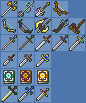
Here, have some more random weapons!
Includes some weapons from FE4, some from FE14, Radiant Dawn swords and knives, Ragnell, Rex tomes, Golden Dagger and Master Sword from LoZ.
2 Likes
I went through and added all the icons in this thread to the Repo, however the link for these FE5 icons is dead. Does anyone have a copy?
1 Like
This is over a month late but I was sorting through some old stuff and noticed I had the FE5 icons downloaded from a long time ago so here’s a mirror.
1 Like
I actually made some effort on my part of editing FE9/10 weapons!
They are quite the challenge and they are my first time making an actual weapon icon for the GBA but they were worth it.
Amiti: 
(I think I made the closest imitation of the Amiti)
Florete: 
(Yeah I know, GBA doesn’t have pink but the handle and hilt come close)
Stiletto: 
(Not sure how accurate it looks on shape wise but I did my best)
Tempest Blade: 
(Let me tell ya’ll, I did not made it from scratch)
Venin Edge: 
(Again the palatte color but the hilt and handle works great)
You’re probably wondering, did I made these from scratch? No.
I legit grabbed the FE10 Weapon Icons and just crop out the weapons I wanted, which is what you can see up there. (A bit difficult to get the size of crop right on these weapons but was worth it.)
Resize them to the GBA’s 16x16 size, insert them, save them and by this guide right here http://feuniverse.us/t/basic-weapon-icon-editing-and-insertion/ for me to use the right tools for FE8’s weapon colors. I picked the colors that somewhat matched and inserted them for the Amiti, Florete, Stiletto and Venin Edge (as best as I see fit from the colors given).
Surprisingly, Tempest Blade actually worked just fine minus the little mess of colors it gave off. All I had to do for it was clean off those unnecessary colors and it just works like a charm, so if you like them use them. Course if anybody here who is skilled are welcome to polish up Amiti and the others.
1 Like
I divided the image of the icon icon of Weapon Icons (All F2U) of Animation Repository into 16x16 so that it can be imported into FEBuilderGBA.
//Those which are too different in format are not transplanted.
//
//convert -crop 16x16 foo.png icon_%03d.png
https://cdn.discordapp.com/attachments/206588291053649921/524563835156299819/icon_split.7z
5 Likes
 Flame Sword
 Luna Sword
 Shield Axe
 Snake Spirit


 Blár, Svartr, Gronn & Rauðr Snake Spirit
10 Likes
 Rauðrserpent
 Blarserpent
 Gronnserpent
 Hvitrserpent
 Svartrserpent
8 Likes
 Kilji
Kilji
 Elephant Tusk
 Estoc
Estoc
 Khanda
 Scimitar
 Scissor Axe
 Medusa Bow
 Valter’s Cursed Lance
 Brave Spear
7 Likes
Have some more sprites: 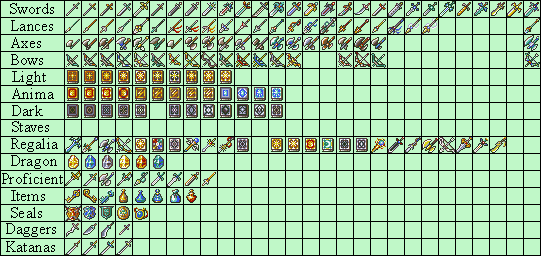
3 second Edit: forgot an Axe. 
13 Likes
Didn’t know whether to edit my last post or to make a new one… but i think i went a little overboard. 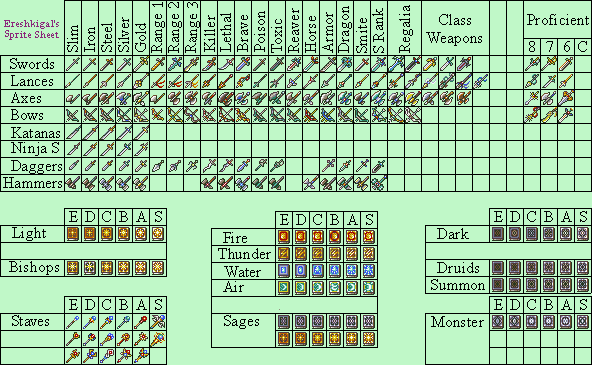
 Anyway have some more sprites
18 Likes
Absolutely beautiful work!
2 Likes
 Amelia’s Axe FE:Heroes (Grado Poleaxe).
 Basilikos FE:Heroes
 Light Brand FE:Heroes
 Luna Bow FE:Heroes/Shadows of Valentia
 Nidhogg FE:Heroes (I finally did a better, more accurate, version of this one)
 Royal Sword FE: Shadows of Valentia
 Silverbrand FE:Heroes
 Valter’s Cursed Lance FE:Heroes
 Vassal’s Blade FE:Heroes
After all of the FE Three Houses hype I found that deep passion for Fire Emblem coming back so here are some more FE:Heroes weapons. Do whatever you want with these, I absolutely love downloading ROM hacks and seeing my weapon icons getting used, its been such a great feeling.
Edit: Reuploaded some of these with better versions. Shortened the length of Vassal Blade’s ribbon, changed Luna to a more black and gold appearance in accordance to its look in Heroes and lengthened the arms of the bow, and shortened/removed some spikes from Valter’s Cursed lance to reduce the cluttered feeling.
15 Likes
FE:Heroes Poleaxe, totally not Azura’s Urðr and you have to do Berkut’s Lance+
3 Likes
 Axe of Virility FE:Heroes (Bartre’s prf)
 Barbed Shuriken FE:Heroes (Kaze’s Weapon)
 Deathly Dagger FE:Heroes (Jaffar’s prf)
 Argent Bow FE:Heroes (Klein’s prf)
 Short Bow FE:Heroes (Sue’s Weapon)
 The Cleaner FE:Heroes (Legault’s Weapon)
 Florina’s Lance FE:Heroes
 Shanna’s Lance FE:Heroes
 Regal Blade FE:Heroes (Lloyd’s Weapon)
 Spy’s Dagger FE:Heroes (Matthew’s prf)
And for your requests:
 Poleaxe FE:Heroes (Gerome’s Weapon)
 Berkut’s Lance+ FE:Heroes
 Uror FE:Heroes (Holy crap this one was hard, I still don’t know if I’m pleased with it because of its complexity but this was my best shot).
If you or anyone have any other requests I would be happy to take a shot.
13 Likes
Heroes Mulagir?
Edit: Forget about it, I didn’t see you already done it.
2 Likes
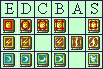
I made a couple anima tomes… T̶h̶e̶ ̶w̶i̶n̶d̶ ̶o̶n̶e̶s̶ ̶a̶l̶l̶ ̶l̶o̶o̶k̶ ̶t̶h̶e̶ ̶s̶a̶m̶e̶ ̶b̶u̶t̶ ̶o̶h̶ ̶w̶e̶l̶l̶
8 Likes
That’s ok. Wind is invisible anyway, so it looks the same to everyone.
4 Likes
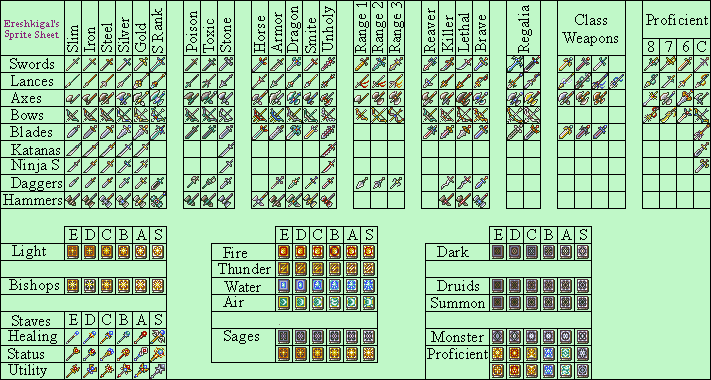
Back at it again. this time i split blades and swords into two distinct types, added a third S rank staff to round out 3 specific types, Healing, Utility, and Status depending on if you think using a staff to turn people into stone is “utility”. Added Stone Weapons and Unholy(Manslaying) Weapons to give monsters deadlier and more unique weapons. made 2 unique proficient tomes for each type, and added some proficient weapons. Enjoy!
15 Likes