FEditor Adv Render Overhaul
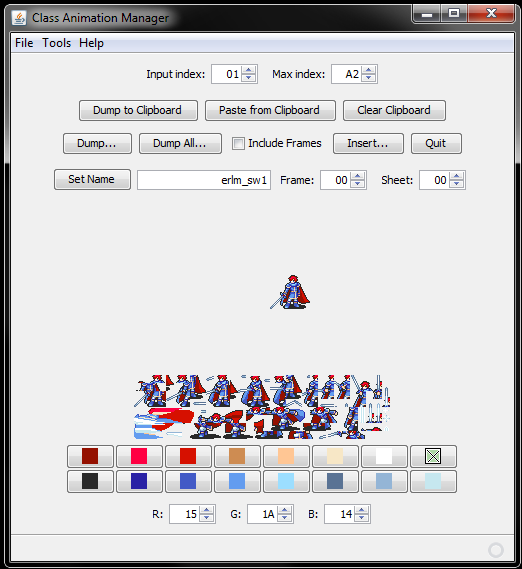
I had some time to look through @Hextator’s Doc & source code for FEditor Adv, and it inspired me to fix up some of the render glitches for the Class Animation Manager. While I was at it, I figured it wouldn’t hurt to add a few handy features for any animation buffs out there.
From the included changelog:
Fixed OAM Render in Class Animation Manager
- Corrected handling of tile alignment (Big thanks to BwdYeti for this fix)
- Adds a tile scaling factor of 8 to fix render of frames
- Added handling for flipped tiles
- Added method for handling Load Transformation Data (LTD) OAM (determines rotation/scaling for OBJs)
- Can handle up to 5 rotated/scaled OBJ simultaneously
- Added corrected rendering for rotation/scaling OBJs
- All animations should render near to identical to in-game rendering
Added “Include Frame” option for animation packages
- Adds a check-box option to dump animation frames along with animation package
- Includes Cam’s animation script converter to include animation script to frame folder (Thanks again Yeti!)
- fixes naming convention to match FEditor’s naming convention
- corrects sign issue when framecount exceeds 128
- “Dump” option works the same as before if check-box is left unmarked
- Also has a “Dump All” option to dump entire Animation Array for current game (Thank Yeti for this one too)
Added “Convert” button to Text Editor/Viewer to format text scripts for insertion
- Takes a preformatted txt file and converts it into separate txt files formatted for insertion in Text Editor/Viewer
- Essentially does what the .bat file in FEditor Adv’s root folder does
- Requires a particular format to the script to work (See the “Natural Script Formatter.txt” in the doc folder)
As with any tool, make sure to backup your work before making edits! Contact me if there’s any issues you come across, but there shouldn’t be anything different besides the new rendering.